Open Badge 3.0 Explained: The New Standard for Digital Credentials
Open Badge 3.0 (OB3) is the current standard for digital credentials. If you issue digital badges — and understanding what digital badges are is a useful starting point — knowing OB3: what it is, what it does, and why it matters, is increasingly important. Organizations that issue OB3-signed credentials are issuing something verifiable. Organizations that issue unsigned badges are issuing something that looks similar but can be faked.
This article explains OB3 in plain terms: how it works technically, why cryptographic signing matters, and what you need to do to issue OB3-compliant credentials.
Background: Why a Standard Was Needed
Digital badges have existed in various forms since the early 2010s. The original Open Badge standard (OB1, then OB2) was created by Mozilla and later adopted by 1EdTech (formerly IMS Global). OB2 established the basic structure of a badge: an image file with embedded JSON metadata identifying the issuer, earner, and achievement.
OB2 had a fundamental limitation: the metadata could be altered. An OB2 badge was essentially a JSON document embedded in a PNG. Anyone who modified the file to change the issuer name or earner identity could produce a plausible-looking fake. Verification depended on the issuer's hosted baking service remaining available — if the issuer's website went down, the badge couldn't be verified.
OB3, released in 2022 and reaching full adoption through 2023–2025, addresses both problems with cryptographic signing and a new data model based on the W3C Verifiable Credentials (VC) specification.
What OB3 Actually Does
OB3 restructures the credential as a Verifiable Credential — a JSON-LD document that includes a cryptographic proof.
The proof works like this:
- The issuing organization generates a keypair — a private key and a public key
- The private key is used to sign the credential document, producing a digital signature
- The public key is published at a known URL (usually the issuer's DID — Decentralized Identifier)
- The signature is embedded in the credential alongside the content
When a verifier receives the credential and wants to check its authenticity, they:
- Retrieve the issuer's public key from the published DID
- Use the public key to verify the signature
- If the signature is valid, the credential is authentic and unaltered
This works entirely offline once the public key is retrieved — the verifier doesn't need to contact the issuer's verification system. And because the signature is embedded in the credential itself, altering any part of the content (earner name, issue date, credential description) breaks the signature and causes verification to fail.
What This Means in Practice
For issuers: Your organization needs an OB3 keypair. It signs every credential you issue, and the private key must be kept secure — it's the root of your credentials' integrity. In CertLister, the keypair is created and stored for you when you turn on Open Badge 3.0.
For earners: Your OB3 badge is self-contained proof. You can drop it into the 1EdTech OB3 validator, share it with an employer who uses an OB3-compatible reader, or submit it to any institution that accepts Verifiable Credentials — and it will verify without anyone contacting the organization that issued it. See the step-by-step walkthrough on how to verify an OB3 credential for exactly what that process looks like.
For verifiers: You can verify an OB3 credential from the file alone. You don't need to navigate to the issuer's website, create an account, or rely on the issuer's infrastructure being available. The cryptographic proof in the file is sufficient.
OB3 vs OB2: What Changed
| Open Badge 2.0 | Open Badge 3.0 | |
|---|---|---|
| Underlying standard | Mozilla/IMS JSON-LD | W3C Verifiable Credentials |
| Cryptographic signing | ✗ Not supported | ✅ Required for compliance |
| Verifiable without issuer contact | ✗ Depends on hosted service | ✅ Yes, from file alone |
| Tamper-evident | ✗ Metadata can be altered | ✅ Alteration breaks signature |
| Decentralized identifiers (DID) | ✗ | ✅ Issuer identified by did:web |
| W3C VC compatible | ✗ | ✅ |
| Accepted by LinkedIn verification | Limited | ✅ Growing support |
The practical implication: OB2 badges are signed by the image's hosting service; OB3 badges are signed by the issuer's cryptographic key. The difference is that OB3 credentials survive the issuer changing their platform or going offline — the signature stays valid.
The 1EdTech Validator
1EdTech maintains a public validator for OB3 credentials at https://1edtech.org/badge/validator (search "1EdTech OB3 validator" to find the current URL). CertLister also provides an OB3 badge validator for quick in-browser checks. Drop a badge file into either validator and it returns:
- Whether the cryptographic signature is valid
- Whether the issuer's DID resolves correctly
- Whether all required OB3 fields are present
- Any compliance warnings
CertLister's OB3 badges pass the 1EdTech validator. When you issue a credential with OB3 enabled in CertLister, the badge file can be independently validated at any time, by anyone, using the 1EdTech tool.
How to Enable OB3 in CertLister
CertLister makes it straightforward to issue OB3-compliant digital badges — OB3 credential issuance is available on every CertLister plan. Setup takes a few minutes.
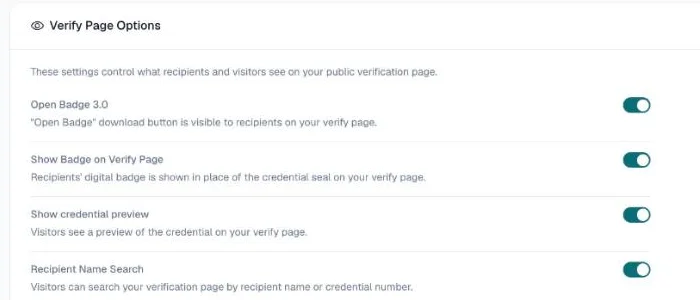
Step 1: Turn on Open Badge 3.0. Go to Verification Page, open the Options tab, and turn on Open Badge 3.0. From then on, every credential's verification page offers a signed OB3 file.
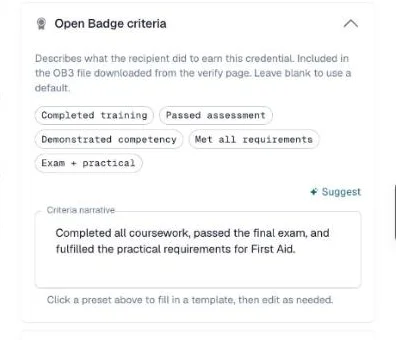
Step 2: Add a criteria narrative to each category (optional). OB3 describes what the earner did to receive the credential. Go to Categories, click the pencil icon on a category, and fill in the Open Badge criteria section near the bottom of the drawer — pick a preset or write your own. It goes into every badge issued in that category.
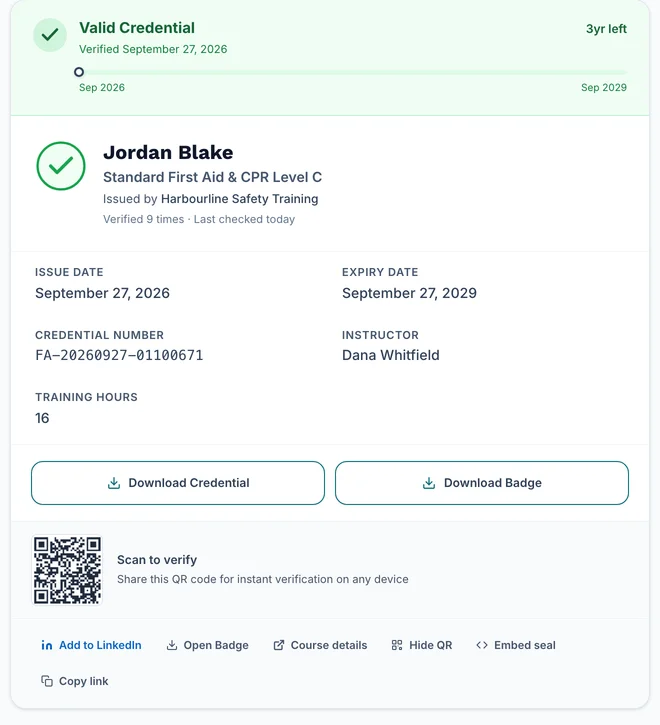
Step 3: Verify a test badge. Issue a test credential to yourself and open its verification page. Click Open Badge at the bottom of the result — a signed .jwt file downloads. Drop it into the CertLister OB3 validator or the 1EdTech validator to confirm the signature validates correctly.
Who Should Issue OB3 Credentials
OB3 is relevant any time credential authenticity matters to a third party.
Professional certifications. If your certifications are referenced in hiring decisions, submitted to licensing bodies, or used to demonstrate qualifications to clients, OB3 signing is the difference between a credential that proves something and one that claims something.
Compliance training. For certifications that affect whether an employee can legally perform a task (OSHA, confined space, electrical safety), the credential needs to stand up to external scrutiny. OB3-signed credentials do.
Association credentials. Professional associations issuing membership credentials, CPD points, or designation letters are increasingly expected to provide verifiable, tamper-evident credentials. OB3 is the recognized path to that.
Academic and continuing education. As employers and academic institutions adopt VC-compatible systems, OB3 credentials become the format that integrates cleanly with those systems.
The Broader Context
OB3 is part of a larger shift toward Verifiable Credentials as the standard for anything credential-like — from professional certifications to academic transcripts to government-issued IDs. The W3C VC specification that OB3 is built on is the same foundation as emerging digital identity systems.
Organizations that issue OB3 credentials today are ahead of the shift. The credentials you issue now will remain verifiable as the VC ecosystem matures — because they're built on an open, cryptographically grounded standard rather than a proprietary platform's hosted service.
Issuing OB3 isn't complicated. It's one setting. CertLister generates and stores the keypair and handles the technical complexity. What you get is credentials that are genuinely verifiable — not just aesthetically credible.
See it in action. No card, no commitment
Join schools, companies, and training centers using CertLister. Free plan available, no credit card required.
Get Started Free