Employee Certification Tracking Without the Spreadsheet
One register for every certification your people hold: who has what, what expires when, and a list you can hand an auditor.
Forklift and equipment tickets, first aid and CPR, WHMIS and workplace safety, food handling, compliance training, and any certification a role requires.
Free plan · No credit card
Transcript
A new hire's forklift certificate arrives by email.
It goes into a personnel file, and into a spreadsheet when someone has time.
Three people keep three versions, and nobody is sure which one is current.
Then an auditor asks who is certified for what, and putting the list together takes days.
CertLister keeps every certification your people hold in one register.
Make a category for each certification, like forklift, first aid or WHMIS.
Add the details you track, such as the site or the trainer.
Import your spreadsheet once, one row per certification, with the date it expires.
When a new hire brings a certificate, record it and attach their PDF.
Before anything expires, the employee gets a reminder, so nobody has to chase them.
And when a date passes, the record shows as expired on its own.
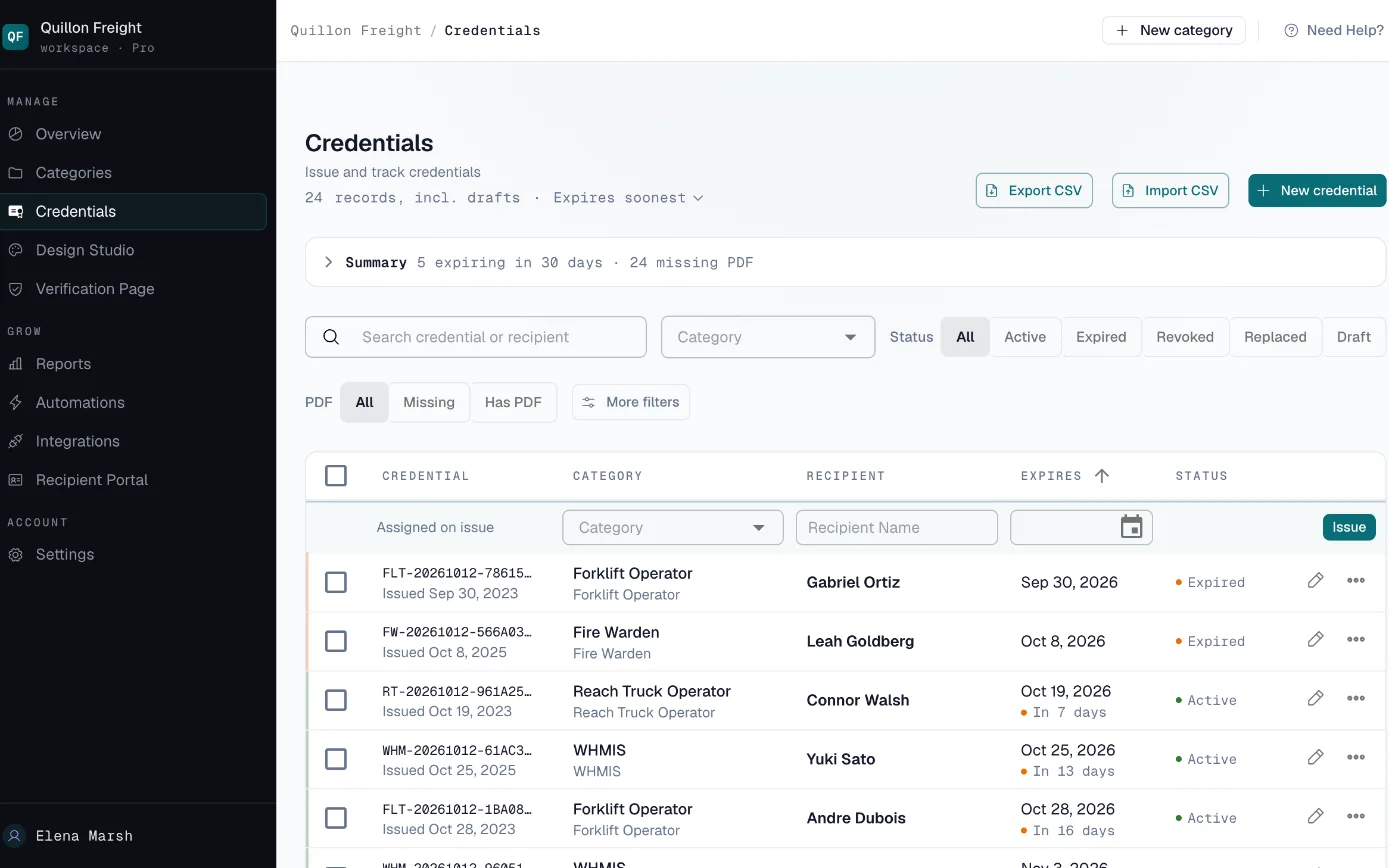
When an auditor asks, filter by certification or by what expires in the next ninety days, and export the list.
Start free at certlister.com.
Certifications Live in Too Many Places
Nobody is sure which copy is current
Certificates arrive by email, sit in personnel files and get typed into a spreadsheet when someone has time. Three people keep three versions.
New hires arrive with paper
New staff bring certifications from past employers and outside trainers. Someone has to record each one and remember when it runs out.
Audits start with a scramble
When an auditor or a client asks who is certified for what, putting the list together means days of chasing managers and files.
Set Up Your Register in Four Steps
-
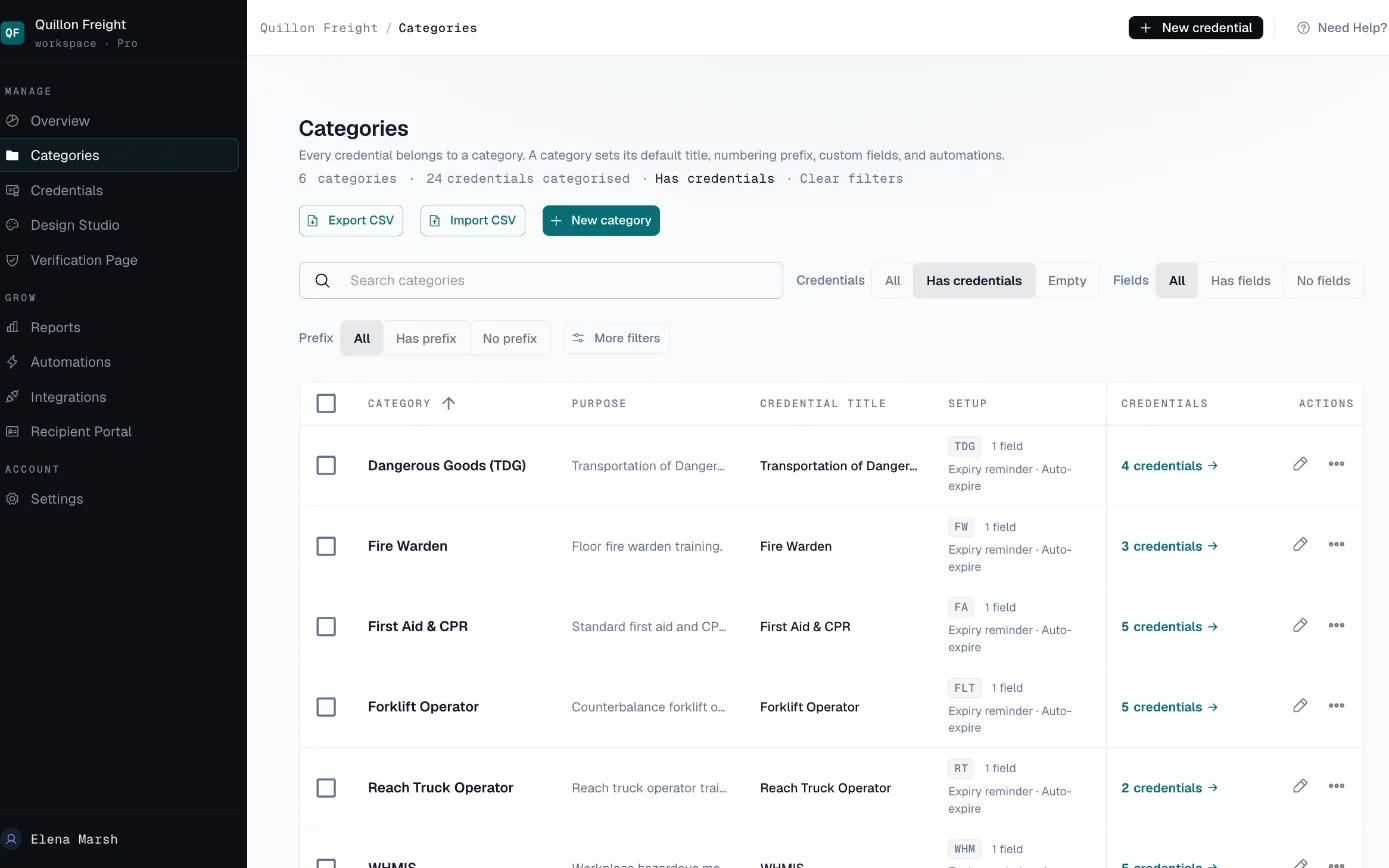
Make a category for each certification
Forklift, first aid, WHMIS: each category has the extra fields you track, such as the trainer or the site, plus its own reminder switch and renewal link.
-
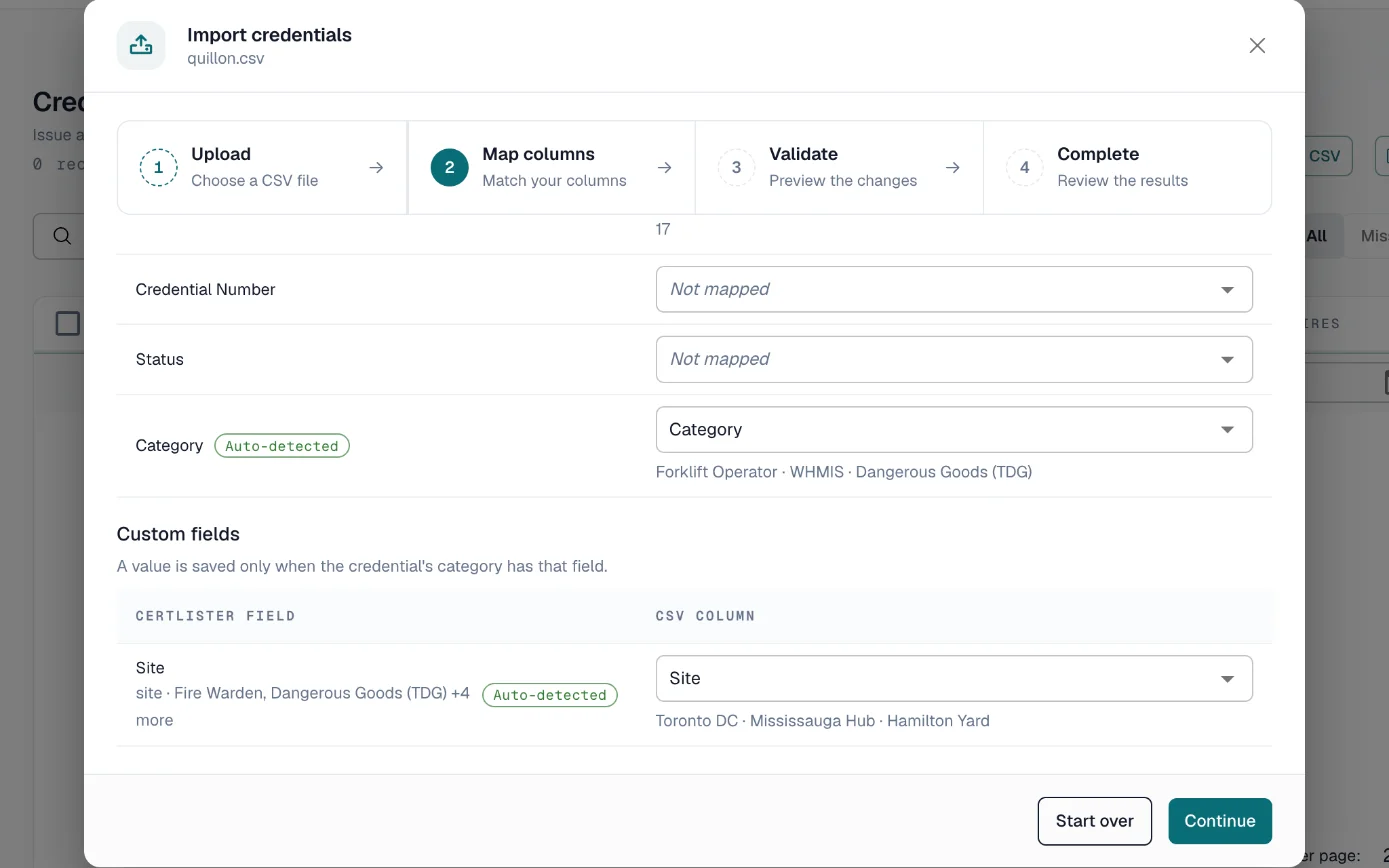
Bring your records in
Import your spreadsheet, one row per employee certification, with the date it was earned and the date it expires. Attach the PDF an employee already has.
-
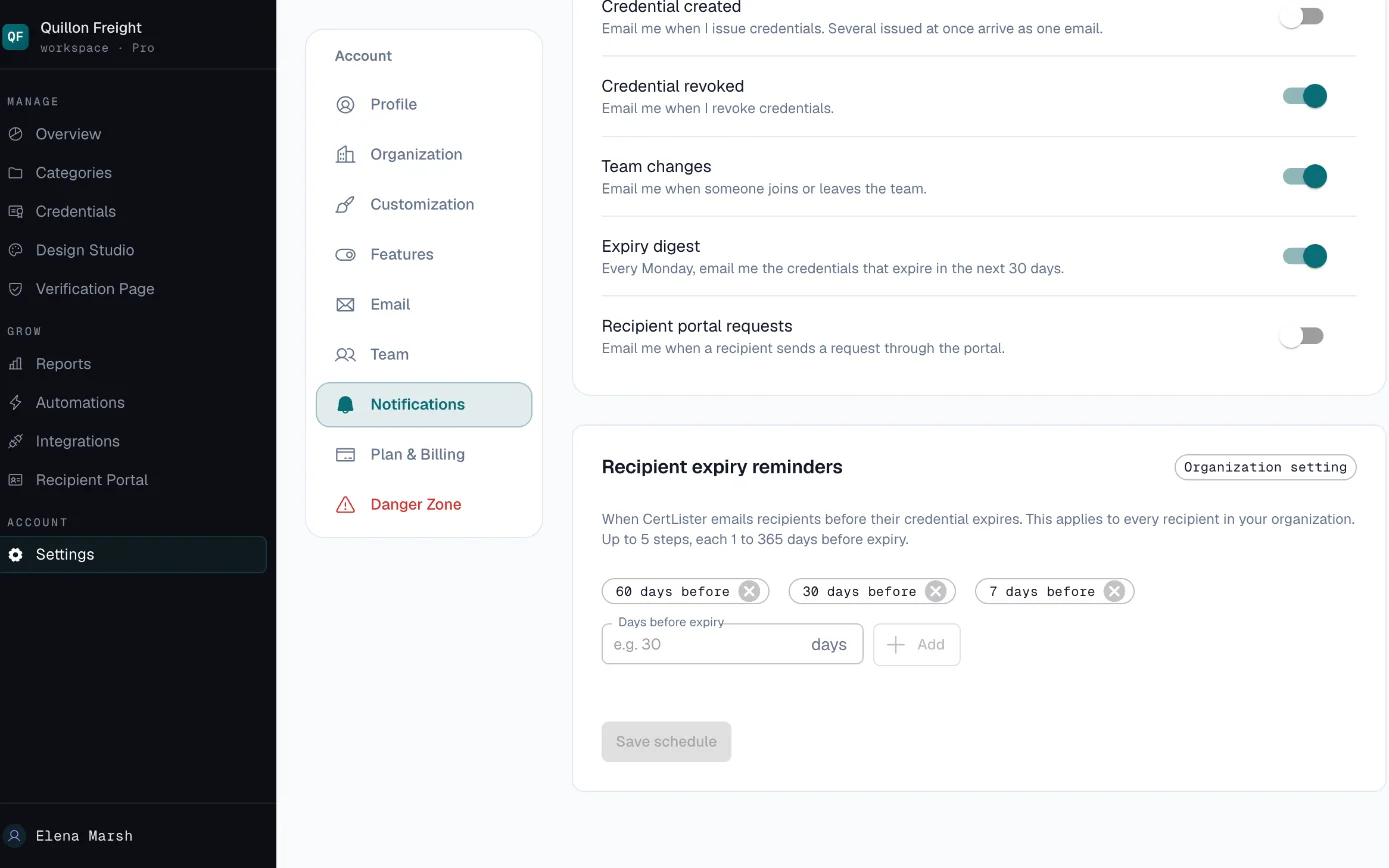
Let reminders do the chasing
Employees get reminder emails on the dates you set before a certification expires. Admins and managers get a weekly digest of everything expiring in the next 30 days.
-
Pull the list for an audit
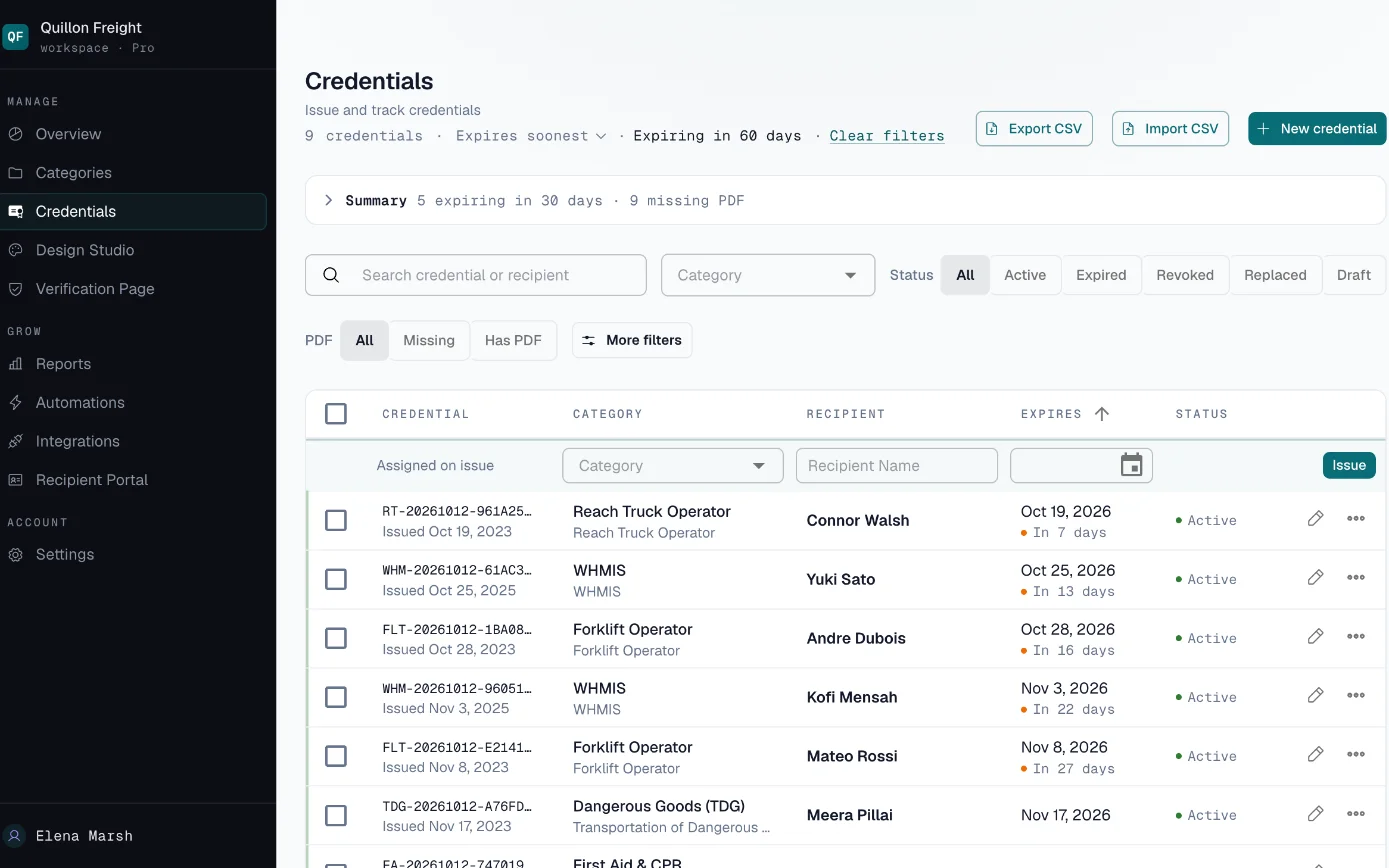
Filter by certification, status or what expires in the next 30, 60 or 90 days, then export that selection to CSV.
Built for Keeping Certifications Current
- Categories and Custom Fields
- Track each certification type the way your company needs.
- Give every certification type its own category, turn reminders on for the ones that expire, and add text fields for details like the trainer, the site or a licence number.
- Reminders and a Weekly Digest
- Employees and managers hear about expiries before they happen.
- Reminder emails go to the employee on up to five dates you choose. Every Monday, admins and managers get a digest of everything expiring in the next 30 days.
- Filters and CSV Export
- Answer "who is certified for what" in a few clicks.
- Filter by certification, status or upcoming expiry and export the selection, or export every record at once. Your custom fields come with it.
- Team Roles Basic
- Managers keep records current without touching settings.
- Admins manage settings, billing and the team. Managers issue, edit and delete credentials. Basic includes five people and Pro has no limit.
- Employee Portal
- Employees look up their own certifications without asking HR.
- Employees sign in with a one-time code sent to their email and see and download their own records. On Pro they can also send you an updated PDF to review.
Who Gets What
- Employees
- Reminder emails before their certifications expire and, if you turn it on, a portal where they see and download their own records.
- Managers
- A Monday digest of everything expiring in the next 30 days, and the register to filter by certification or upcoming expiry.
- Auditors and clients
- A CSV of the records you choose to share, or a credential number to check on your verify page, which shows your record of it.
Bringing Your Records In
Most HR teams start from a spreadsheet. Import it once, and CertLister becomes the place you keep certifications current.
- CSV import with column matching, up to 2,000 rows at a time
- Each row needs the employee's name and the date the certification was earned; add the expiry date so reminders can work
- Attach the PDF an employee already has to their record
- Each record you import uses one credit; Basic includes 1,000 a month
Who Can See What
CertLister keeps your own record of each certification. It does not check with the body that issued it, so your verify page confirms your record, not the original.
Inside your account, Admins and Managers can issue, edit and delete credentials. Pay As You Go includes one team member, Basic five, and Pro has no limit.
Your public verify page shows a credential to anyone who has its number. You can hide any custom field from that page, and you can turn off search by name.
How we handle data: Privacy Policy, Security, Data Processing Addendum.
What It Would Cost
A company with managers at six sites and more than 20 kinds of certification fits Pro: no limit on team members, categories or automations. Employees can upload the PDF of a certificate to their own record in the recipient portal, and it is attached once you approve it. Your HR system can create records through the API or webhooks.
Several departments or sites, or a security review to pass? Look at Enterprise. See full pricing →
Frequently Asked Questions
Do employees need an account?
Can CertLister confirm a certificate a new hire brings from another employer?
What can custom fields hold?
How many people can manage the records?
Is a certification marked expired automatically?
Related solutions
Related features
Related Articles
How Long Do You Have to Keep Training Records?
Training record retention requirements, checked against the actual rules: what OSHA, the EEOC and ISO 9001 specify, what they deliberately leave to you, and why the period that protects you is longer than the one any standard names.
Read moreHow to Prepare for a Training Compliance Audit in Under an Hour
A practical guide for HR and compliance teams to prepare for a training compliance audit — what auditors ask for, how to organize records, and how to produce evidence in minutes instead of days.
Read moreHow to Choose a Training Records Management System
A buying guide for HR and compliance teams evaluating training records management systems — the criteria that matter, the questions to ask in a demo, and the red flags that show up after you've signed.
Read more