Certification Expiry Tracking Software
Know what expires next, before it lapses.
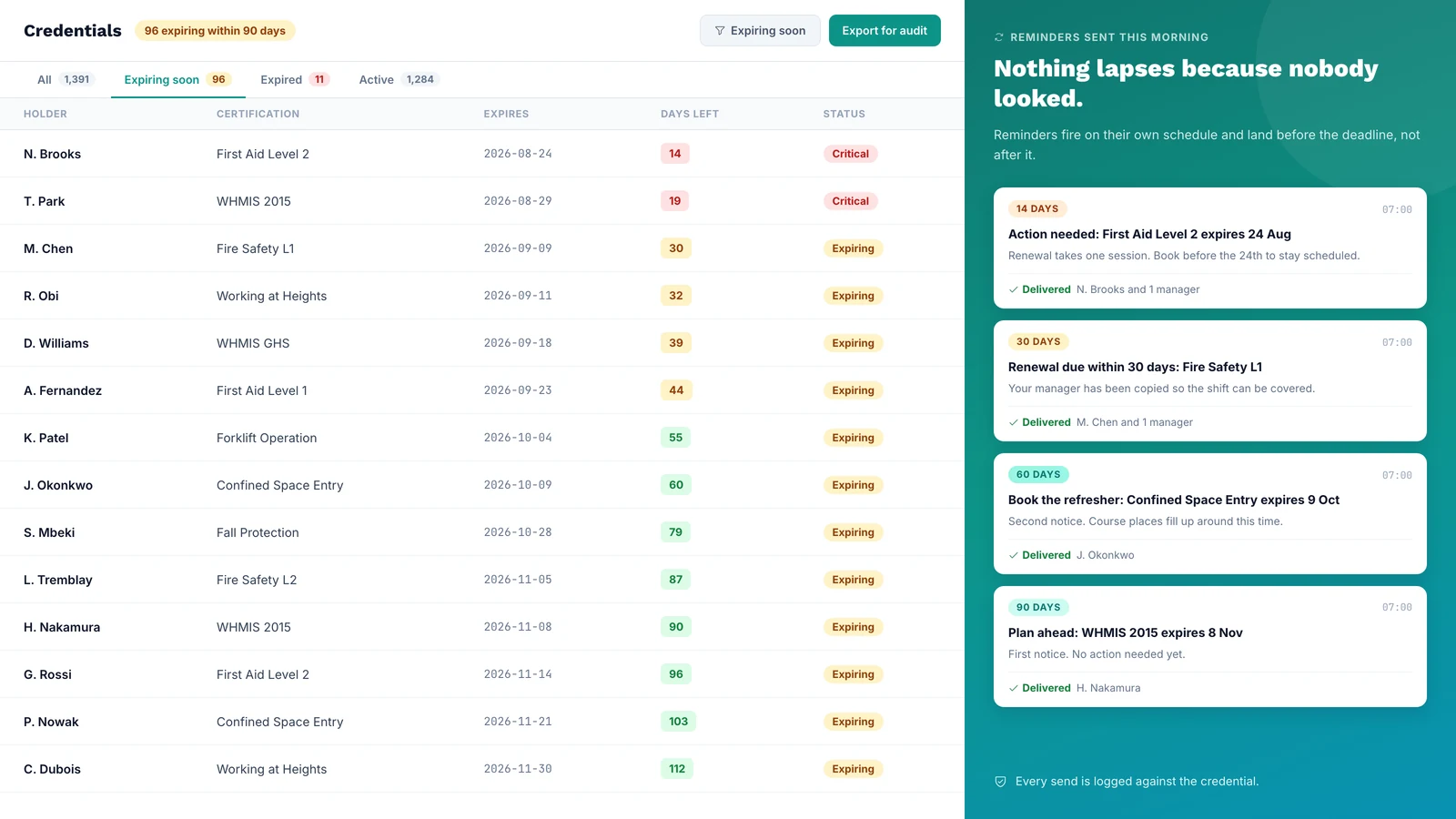
CertLister tracks every expiry date in one register and sends renewal reminders on the schedule you set. Nothing lapses because nobody happened to look at a spreadsheet that week.
Included on every plan · No credit card required
The Problem
Expiry Dates Do Not Drift. Attention Does.
Almost every lapsed certification traces back to the same three failures — and none of them is that somebody forgot the rules.
The spreadsheet goes stale
It was accurate the day it was built. Then someone left, someone renewed offline, and a column stopped being updated. Nobody knows which rows to trust any more.
One person holds it all
Tracking lives with whoever set it up. When they change role or leave, the institutional memory of what expires when leaves with them.
The warning arrives too late
A 14-day notice is useless if the refresher course runs monthly. By the time anyone acts, the lapse is already unavoidable.
How It Works
Set the Date Once. The System Does the Chasing.
There is no weekly review to run and no reminder to remember to send.
Expiry is set at issuance
Give a category a validity period and every credential issued under it inherits an expiry date. Nothing is entered twice, and nothing is left blank to reconstruct later.
Reminders fire on schedule
Reminders go out daily in the background, on the dates you chose, to each holder whose category has reminders on. Admins and managers can get a weekly digest of what expires next.
Status keeps itself current
Records move between Active, Expiring Soon and Expired on their own dates. What you see on any given morning is what is actually true that morning.
Renewal Reminders
One Warning Is Not a System
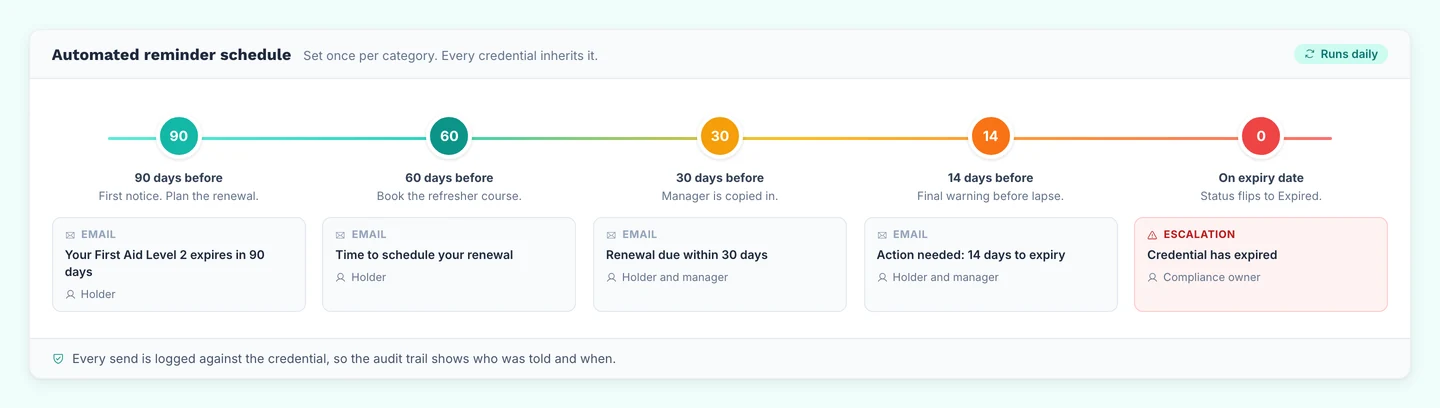
A single email gets missed, filed, or postponed. Up to five reminders, spaced to your renewal lead time, give the holder more than one chance to act.
One schedule, on where you need it
Set the reminder dates once for your organization, then turn reminders on for each certification type that needs them. Categories start with reminders off, so nothing is sent until you choose.
Different timings per certification type
A refresher that runs twice a year needs more notice than one you can book next week. On paid plans, Automations can send reminders at different points for each category, or email your admins.
Status at a Glance
The Whole Register, in One Screen
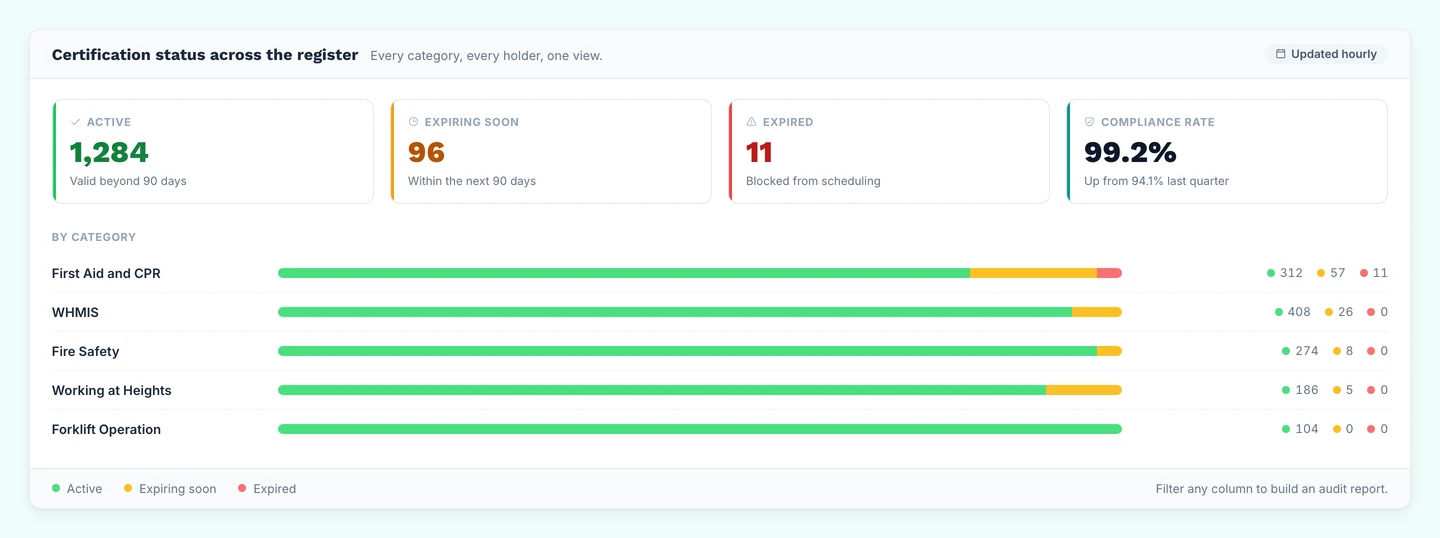
Counts by status and by category, so you can see which certification type is drifting while there is still time to fix it.
At Scale
Update a Cohort's Expiry Dates in One Pass
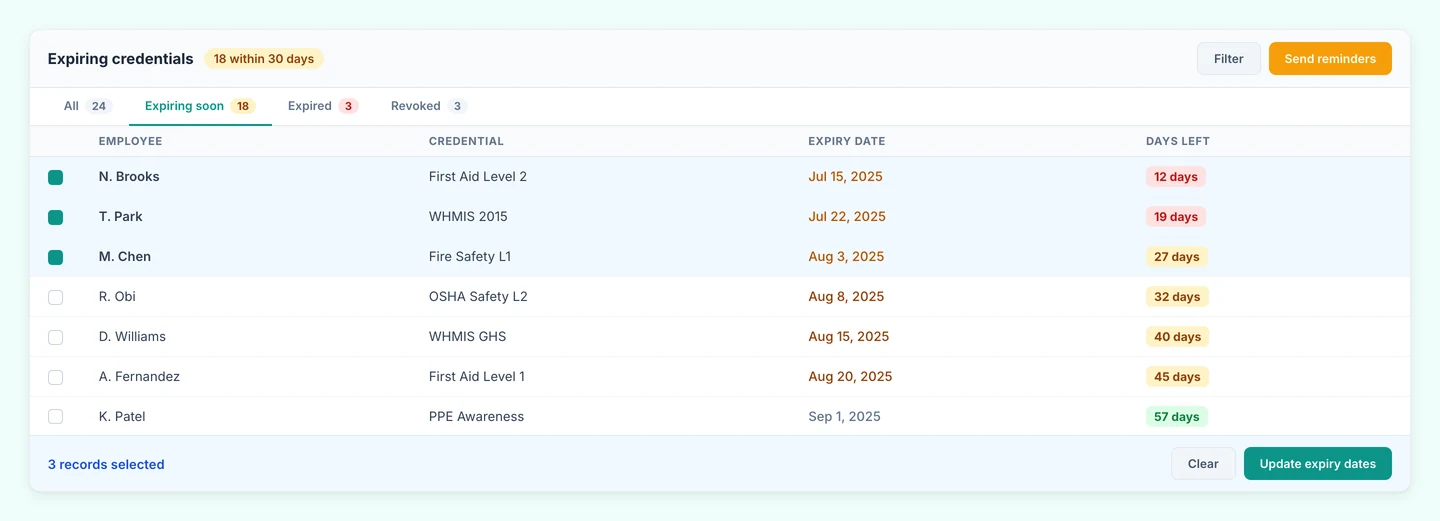
When thirty people sit the same refresher, you should not be editing thirty records. Select the group, set the new date, and their reminders follow the new date.
Prefer to work through the practices rather than the product? Our guide to certification expiry tracking best practices covers the process side — reminder cadences, renewal ownership, and quarterly audits.
After the Date
What Happens When a Certification Expires
Tracking does not stop at the expiry date. To see every lapse in one view, filter the credentials list by the Expired status.
The status changes on its own
Once the expiry date passes, the credential shows as Expired in your register and on its public verification page. Anyone who checks it can see it is no longer current.
The record stays
Nothing is deleted. The expired credential keeps its dates, so you can show an auditor who was certified and for how long.
A renewal replaces it
When the holder renews, issue the new credential as a renewal. It replaces the old one, and the old verification page links forward to the new credential.
Choosing a System
Spreadsheet, HR System or Dedicated Tracker?
Most teams already have one of the first two. Here is what each one covers when the job is keeping certifications current.
| What you need | Spreadsheet | HR system module | Dedicated tracker (CertLister) |
|---|---|---|---|
| A list of who holds what | Yes, while one person keeps it current | Yes, for people in the HR system | Yes, including contractors outside your HR system |
| Reminders before expiry | Only if someone builds them and checks they ran | Often included. Check that every certification type is covered | Yes, on a schedule you set, to each holder |
| Status that updates itself | No. Someone has to read the dates | Usually | Yes: Active, Expiring Soon, Expired |
| Records for people without an account | Yes | Often not. Contractors are usually outside it | Yes. Holders do not need an account |
| Clients or inspectors checking a certification | You send a copy on request | Rarely, without giving them access | Each credential has a public verification page |
| Issuing the credential itself | No | Rarely | Yes, as a branded PDF |
If every certification you track belongs to an employee in your HR system, and nobody outside the company needs to check one, the HR module you already pay for may be enough. A dedicated tracker such as CertLister earns its place once contractors hold certifications too, once clients or inspectors ask for proof, or once you issue the credentials yourself.
Frequently Asked Questions
What software sends compliance reminders before certificates expire?
CertLister does, on every plan including Free. You choose up to five reminder dates before expiry for your organization, for example 90, 60, 30 and 14 days, and turn reminders on for each certification type. Each reminder goes to the credential holder by email. On paid plans, Automations can add different timings for a certification type or email your admins at a point you choose.
How do I track certification expiry dates automatically?
Set the expiry date when you issue or import a credential, or give the category a default validity so the date fills itself in. The register counts down from there: anything due in the next 30 days shows as expiring soon, and anything past its date shows as expired. Turn on reminders for the category and they go out without anyone opening the system.
How do I make sure expiry reminders actually go out?
Check four things on the credential: it has an expiry date, it has the holder's email address, it has not been saved as a draft or revoked, and Send expiry reminder is on for its category or on the credential itself. A credential's own setting wins over its category's. Each reminder is sent on the day it falls due. If you add a credential or turn reminders on after that day, that step is skipped and the next one still goes out. Reminders from your organization's schedule are not listed anywhere in the app. On paid plans, each Automation rule keeps a run log you can open to see what it sent.
Can managers see certification status at a glance?
Yes. The dashboard shows counts by status across the register, with a breakdown by category, so you can see which certification type is drifting before it becomes a compliance gap. Admins and managers can also get the weekly expiry digest email, which lists everything expiring in the next 30 days.
How do I notify managers when certifications are about to expire?
Admins and managers can get the weekly Expiry Digest: an email every Monday listing the credentials that expire in the next 30 days. Each person turns it on or off in Settings under Notifications. On paid plans, an Automation rule can also email admins and managers when a credential in a category expires. It reaches those who have the Credential Created notification turned on, and the category needs Auto-expire on for the rule to run. Reminders themselves go only to the holder.
What happens when a certification expires?
Once the expiry date has passed, the credential shows as Expired in your register and on its public verification page, so nobody can present it as current. The record stays in the register, so the history is kept. When the holder renews, issue the new credential as a renewal: it replaces the old one, and the old verification page points to the new one.
Can I track contractor and subcontractor qualification expiry?
Yes. Contractors do not need an account. You hold the records, and their qualifications sit in the same register as your employees'. Reminders go to the email address on each record, so use the contractor's own address if they should receive them.
Can I track licenses and other expiring documents, not just training certifications?
Yes. A category can be any certification, license, permit or qualification that expires. Import your existing records from a CSV file with their issue and expiry dates, and they get the same status tracking and reminders as credentials you issue in CertLister.
Does this help with audit preparation?
Yes. Filter the register by status and category to show what is current, expiring or expired, then export the selected credentials as a CSV file for the auditor. Each credential also has a verification link an auditor can open without an account.
Which plans include expiry tracking?
All of them, including the free plan. Expiry dates, status tracking and reminder emails are not gated. Paid plans raise the credential volume and add Automations for per-category timings and admin alerts.
From the blog
Certification Expiry Tracking: 7 Best Practices
How to track certification expiry dates, choose reminder lead times and handle a lapse before it becomes a compliance gap. Seven practices for HR and compliance teams.
Read moreCompliance Certificate Tracking: How to Stay Audit-Ready at Scale
How organizations in regulated industries track compliance certificates, manage expiry dates, and prove compliance to auditors — without scrambling when an inspection arrives.
Read moreEmployee Certification Tracking: The Complete HR Guide
How HR teams can track employee certifications, manage expiry dates, and stay audit-ready — without spreadsheets or manual follow-up.
Read moreStop Finding Out After the Audit
Import your existing records, set the expiry dates once, and let the reminders run. Free plan, no credit card, no sales call.