Track Every Safety Certification Before It Expires
For care homes, clinics and home-care agencies that keep staff certifications current: one register, reminders before anything lapses, and a wallet card each person carries.
CPR and BLS, first aid, ACLS and PALS, infection control, medication administration, WHMIS, and any certification a role requires.
Free plan · No credit card
Transcript
A care aide's CPR ran out two months ago.
It was in a binder and a spreadsheet, and neither one said a word.
Night staff, part-timers and agency workers each hold several certifications, and they're rarely in the office together.
So when an inspector asks who holds which training, the answer takes days to pull together.
CertLister speaks up before anything lapses.
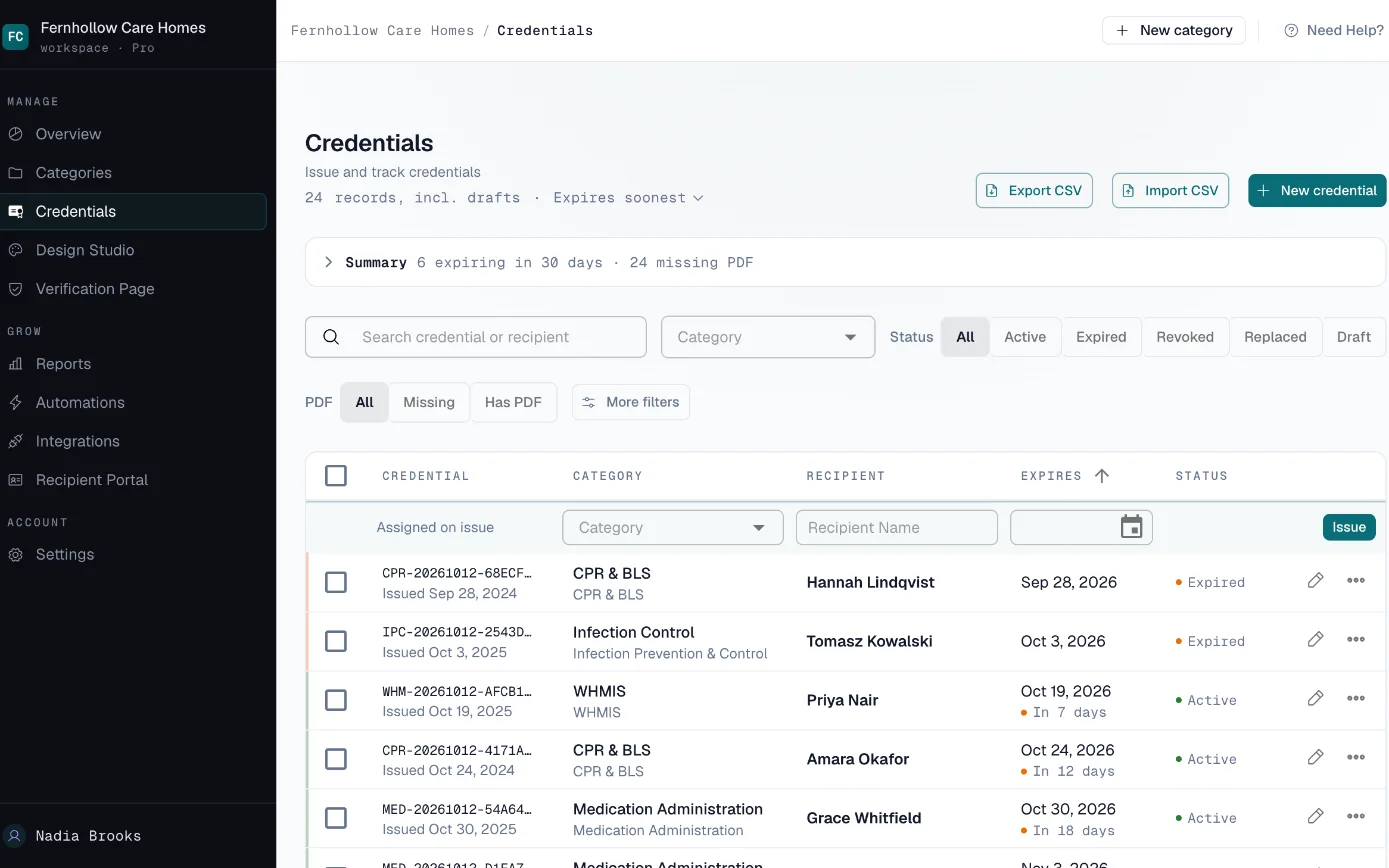
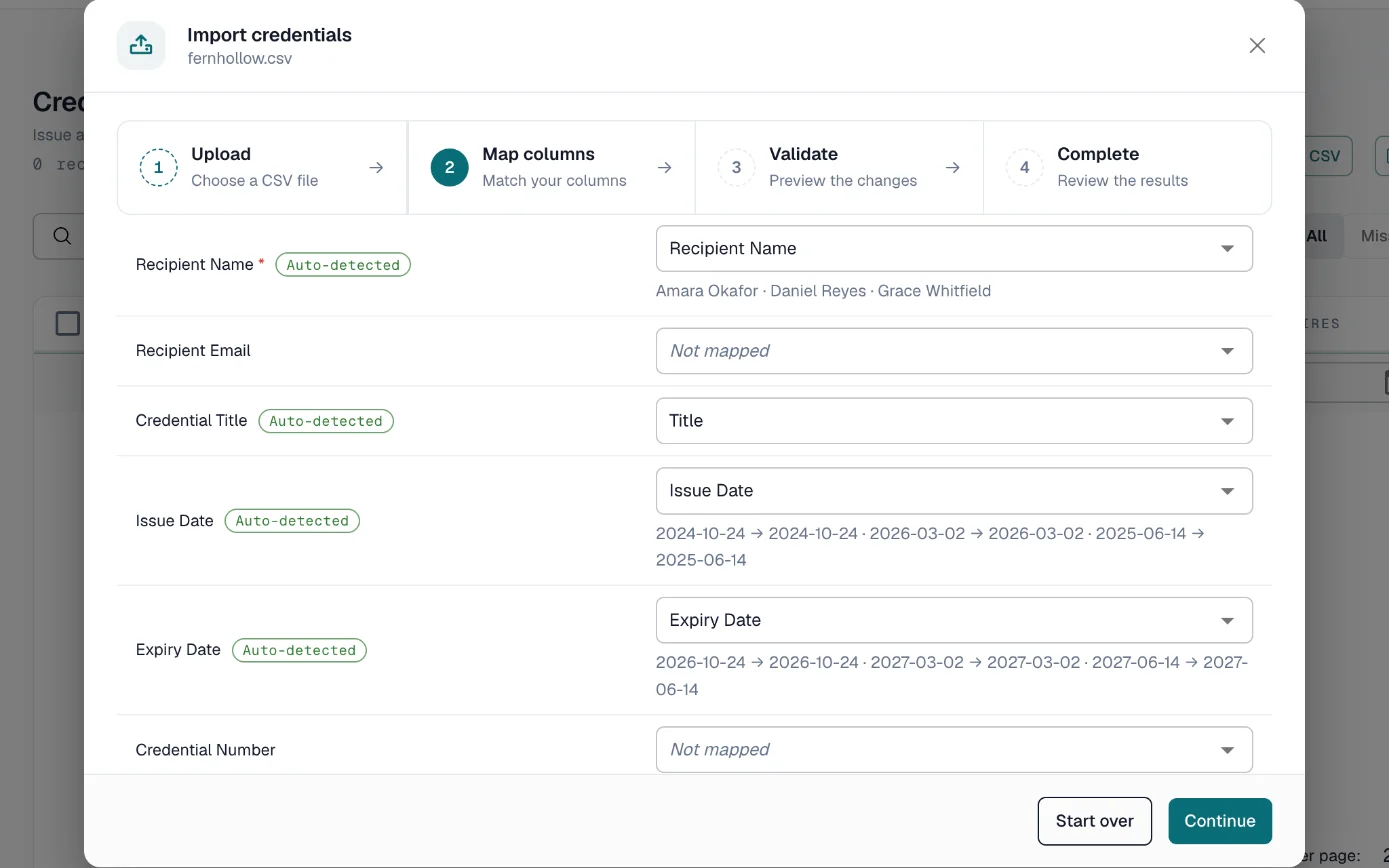
Import the spreadsheet you keep today, with a category for each certification.
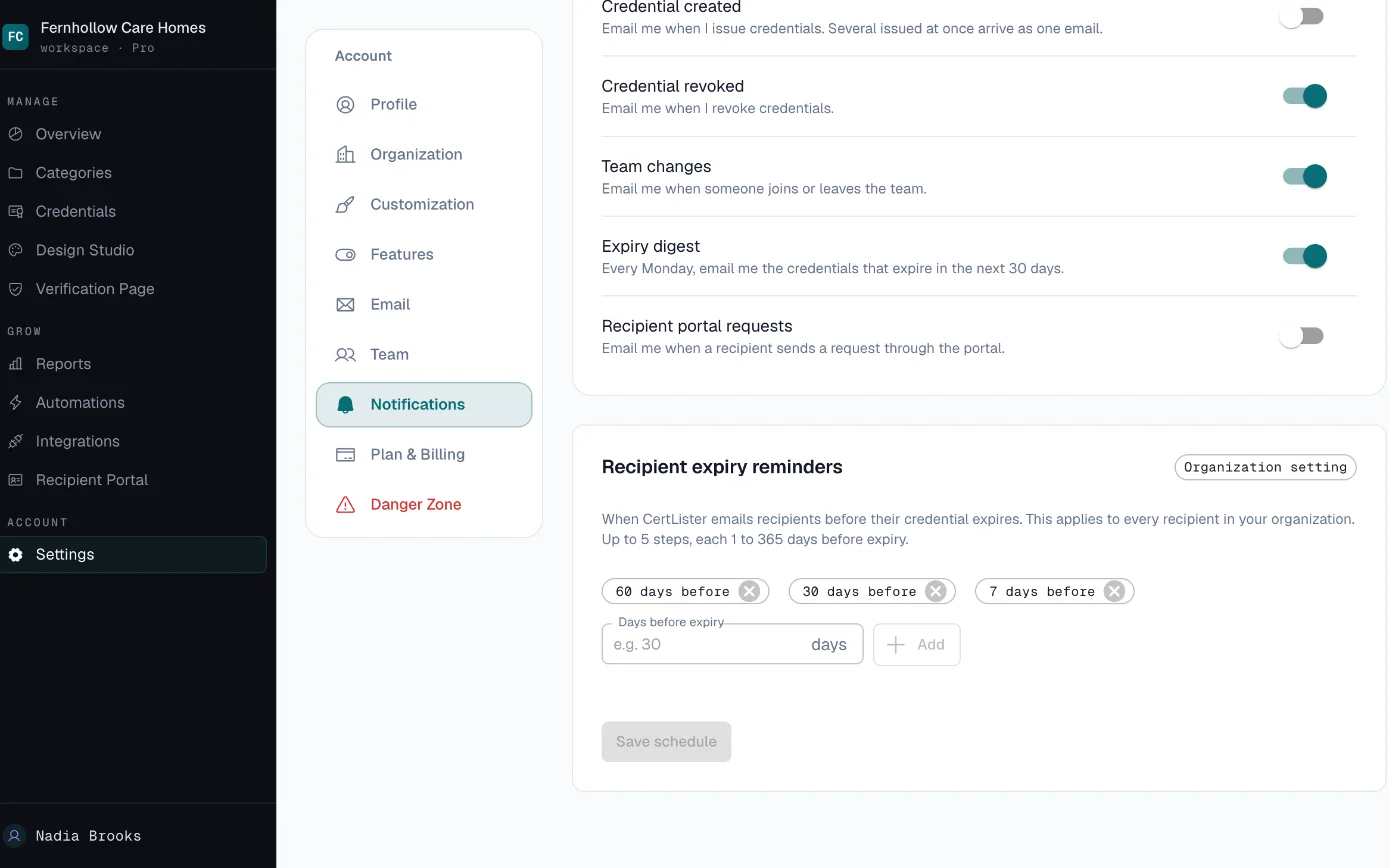
Staff get a reminder email on the dates you choose.
Up to five dates, as early as a year before expiry.
Every Monday, managers get an email listing what expires in the next thirty days.
When an inspector asks, filter by certification and export the list.
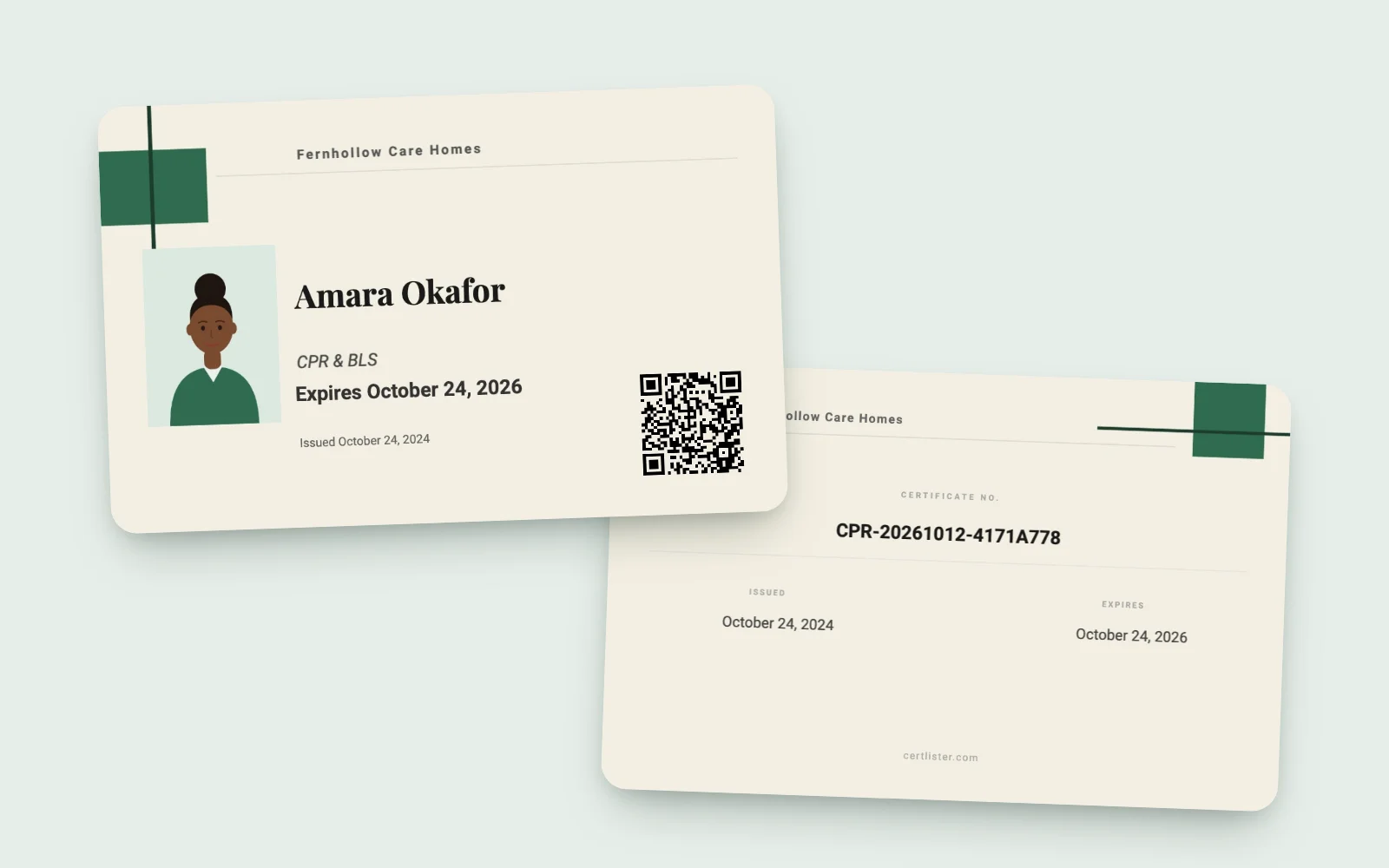
Each person carries a wallet card, on their phone or printed.
Its QR code opens your verify page, with your record: the certification, the dates, and whether it's still valid.
Start free at certlister.com.
A Lapsed Certification Is Found Too Late
Expiry dates nobody watches
A care aide's CPR ran out two months ago. It was in a binder and a spreadsheet, and neither one said anything.
Staff across shifts and sites
Night staff, part-timers and agency workers each hold several certifications. Keeping track of who renewed what means chasing people who are rarely in the office together.
Inspection day
An inspector or a client asks which staff hold which training. Pulling the answer out of files, emails and spreadsheets takes days.
How a Care Team Keeps Certifications Current
-
Record every staff certification
Make a category for each certification, import your current records from a spreadsheet and attach the PDFs staff already have from their training provider.
-
Remind staff before it lapses
Staff get reminder emails on up to five dates you choose. Managers get a weekly digest of everything expiring in the next 30 days.
-
Give each person a wallet card
Generate a card-sized PDF with a QR code that staff keep on their phone or print. On Basic or Pro, add their photo so the face matches the card.
-
Find who's due before an inspection
Filter by certification or by what expires in the next 30, 60 or 90 days, and export the selection to CSV.
What a Care Team Gets
- Expiry Reminders on Your Schedule
- Staff are reminded before a certification lapses.
- Choose up to five reminder dates, up to a year before expiry, and turn reminders on for each certification. Add a link to your training booking page and it appears in every reminder.
- Weekly Expiry Digest
- Managers see what is coming due without running a report.
- Every Monday, admins and managers get an email listing each certification that expires in the next 30 days.
- Wallet Cards
- Staff carry their own record on their phone.
- A two-sided, card-sized PDF with a QR code that opens your verify page. Staff save it to their phone or print it.
- Staff Photo on the Card Basic
- The face on the card matches the person.
- Put a photo frame in your design and each staff member's photo appears on their wallet card and PDF. Photos stay off your public verify page unless you choose to show them for a category.
- Filters and Export
- Pull the list an inspector or a client asks for.
- Filter by certification, status or upcoming expiry and export the selection to CSV, or export every record at once.
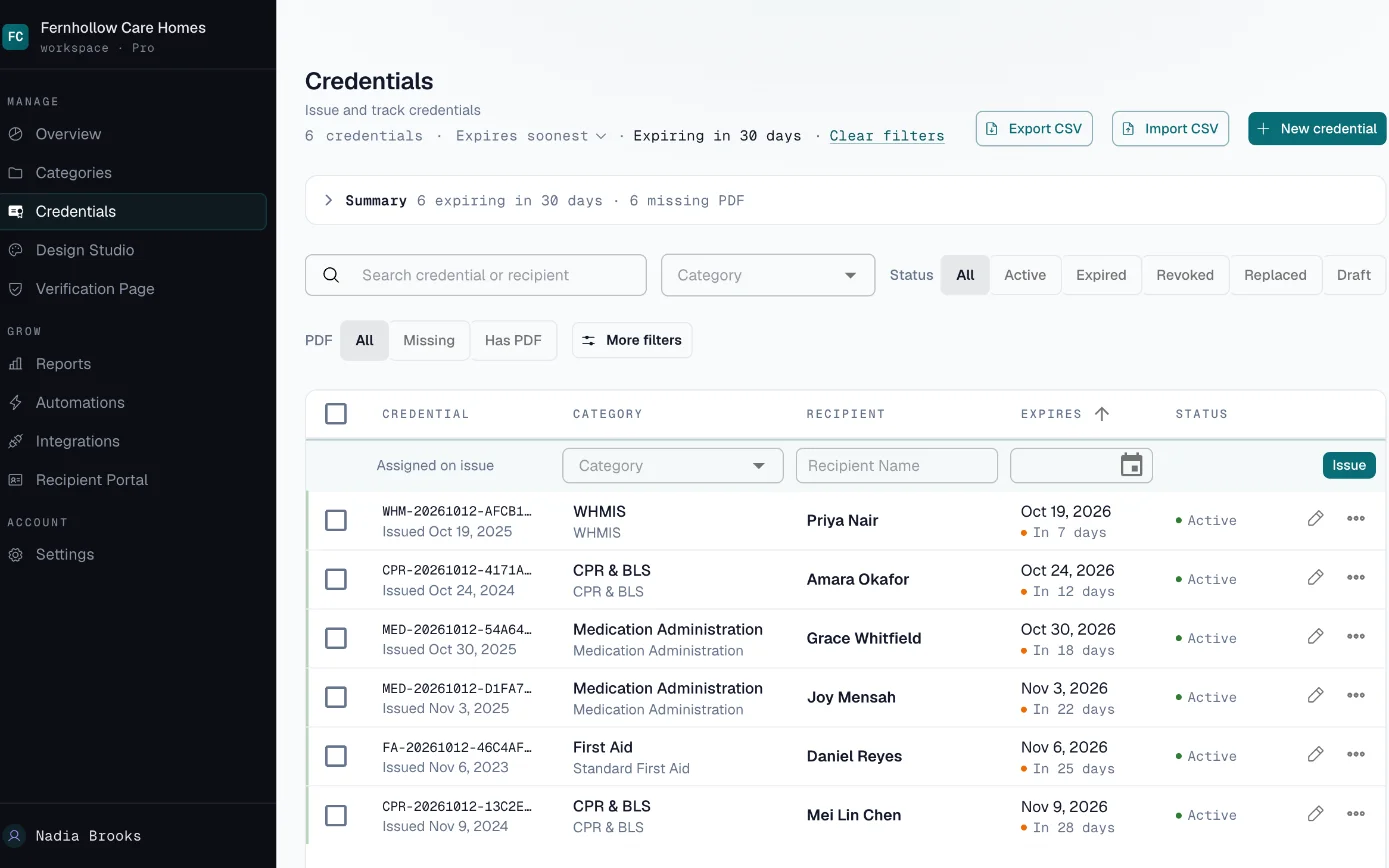
See what expires next, before it lapses
Import your records once. CertLister sorts every credential by expiry date and flags the ones running out.
Start Tracking Staff CertificationsFree plan, no credit card.
Who Gets What
- Staff
- Reminder emails before each certification expires, a wallet card to carry and, if you turn it on, a portal where they see their own records.
- Managers
- A Monday digest of everything expiring in the next 30 days, and a register they can filter by certification.
- Inspectors and clients
- The list you export for them, or a staff member's wallet card. Its QR code opens your verify page, which shows your record of the certification.
Bringing Your Records In
Start from the spreadsheet or binder you have today. Import it once, then keep it current in CertLister.
- CSV import with column matching, up to 2,000 rows at a time
- Each row needs the staff member's name and the date the certification was earned; include the expiry date so reminders work
- Attach the PDF from the training provider to each staff member's record
- Separate categories for employees and agency staff, each with its own fields and its own reminder switch
Who Can See What
CertLister keeps your record of each staff certification. It does not check with the CPR or first aid provider, so your verify page confirms your record, not the provider's.
Inside your account, Admins and Managers can issue, edit and delete credentials. Pay As You Go includes one team member, Basic five, and Pro has no limit.
Your public verify page shows a credential to anyone who has its number. You can hide any custom field from that page, and you can turn off search by name.
How we handle data: Privacy Policy, Security, Data Processing Addendum.
What It Would Cost
A group of care homes with a manager at each home and more than 20 types of certification fits Pro: no limit on team members or categories. Staff can upload the PDF of a certificate to their own record in the recipient portal, and it is attached once you approve it. Reminders show your organization as the sender, not "via CertLister".
Several departments or sites, or a security review to pass? Look at Enterprise. See full pricing →