Changelog

What's new in CertLister

We started building CertLister in December 2024 and launched it in February 2026. Since then we have shipped improvements every month. Newest first.

October 2026

Credentials with up to five pages

A credential can now have up to five pages, in landscape or portrait, and you can keep some pages off your public verification page.

See Design Studio help
  • Transcript tables: list courses, grades or hours on a credential.
  • New templates: a plain page, and five portrait templates.
  • Turn off features you don't use, such as wallet cards or badges, in Settings.
  • Search for credentials, drafts and categories from the top bar.
  • Import credentials into one category, from a file made for that category.
  • Renew a credential straight from its row in the table.

Also fixed: sign-up now accepts email addresses with a plus sign, signing in with Google brings you back to the page you were on, and automatic PDFs now work with your organization's default design.
September 2026

Recipient photos

Add the recipient's photo to a credential. It prints on the PDF and the wallet card, and stays off the public verification page unless you turn that on for a category.

How to add a photo
  • Four new layout templates, and you can change the colours of any template, for PDFs and wallet cards.
  • Nine badge shapes, each with colour palettes.
  • Renew a credential: the new one replaces the old one, which stays on record.
  • Issue a credential from a row at the top of the Credentials table.
  • "Copy style" in Design Studio copies one element's look onto another.

Also fixed: dates on PDFs now follow your organization's language, form fields no longer zoom in on phones, only active credentials count as expiring, and expiry reminders sent by automations now have a translated subject.

August 2026

Bulk work runs in the background

Generate PDFs and badges, or send emails, for up to 500 credentials at once. The work runs in the background while you carry on, and you can follow its progress.

See all features
  • Show a preview of the PDF, wallet card and badge on the verification page.
  • Return an issued credential to draft.
  • Change your sign-in email, confirmed by a link sent to the new address.
  • Invite someone who already has an account to your organization.
  • Spreadsheet imports match categories to the ones you already have.
  • Pages load faster.

Also fixed: a paying organization was sometimes told it had no credits left.

July 2026

Design your own verification page

Start from a template and build a verification page with your own header, footer, colours and content.

See verification
  • Put the verification page on your own domain.
  • CertLister in Spanish: the app, the emails and the verification page.
  • Save a credential as a draft and issue it later.
  • Your own favicon on the verification page.
  • Redesigned emails for recipients and for your team.
  • Help for every page, one click away under "Need help?".

Also fixed: automations now follow their trigger, conditions and expiry settings, dates in the Recipient Portal were sometimes a day off, and size controls in Design Studio now work in Firefox.

June 2026

Integrations: API keys and webhooks

Connect CertLister to your other systems: issue and read credentials through the API, and receive a webhook when something changes.

  • Credits: buy a credit pack when you need more, and see where your credits went.
  • Before an import, see how many credits it will use.
  • Preview credential emails in each language you send them in.

Also fixed: your email language choice now stays after a page refresh, changes to the reminder schedule now save, and badge designs no longer appear when you choose a PDF design.

May 2026

A new look for the app

A redesigned sidebar, page headers, tables and status markers make each page easier to scan.

  • Suggested fields for a new category, written by AI from the category's name.
  • The app is now available in French.
  • When you import categories from a spreadsheet, AI can fill in missing default titles.
  • Import categories together with their custom fields.
  • A live preview while you set up the verification widget for your website.
  • Open a PDF or wallet card in the browser instead of downloading it.

Also fixed: an expiry date earlier than the issue date is now refused when you edit a credential, and spreadsheet imports keep yes/no values when a column is left out.

April 2026

The Recipient Portal

Recipients sign in with a code sent by email to see every credential you have issued them, and can send you requests from the same place.

See the Recipient Portal
  • You get a notification when a recipient sends a request.
  • Digital badges for your credentials.
  • Badges use the Open Badges 3.0 standard.

Also fixed: links in the Recipient Portal now open the right verification page.

March 2026

A clearer verification page

The public page that confirms a credential now shows at a glance whether it is valid, and who issued it.

See verification
  • Two-step sign-in, with a code sent by email.
  • Reports on the credentials you issue.
  • See whether each credential email was delivered.
  • Wallet cards: a card-sized version of a credential that recipients can carry.
  • Attach the credential's PDF to the email the recipient receives.
  • The app now works on phones and tablets.

February 2026

CertLister launches

CertLister launched publicly this month, with paid plans for teams that need more, and Design Studio for laying out your own credentials.

See all features
  • Six new credential templates to start from.
  • Generate PDFs for many credentials at once.
  • Add your own fields to credentials, beyond name, title and dates.
  • Automations: rules that act on your credentials for you.
  • Email notifications when a credential is issued and when your team changes.
  • Team roles, so each member gets the access they need.

Building CertLister, December 2024 to January 2026

What we built before the public launch.

November 2025

Faster, safer and easier to try

  • New accounts come with sample credentials to explore.
  • Bulk actions for credentials and categories.
  • Each organization's data and files are kept separate from every other organization's.
  • Bot protection on sign-in, sign-up and password reset.
  • Much smaller PDF files, and faster sign-in.
  • Pages show their layout while data loads, instead of a spinner.

February to April 2025

PDFs and a smarter import

  • Credentials as PDF files.
  • One import that adds new credentials and updates existing ones, with a colour-coded summary of what changed.

January 2025

The first working version

  • Credentials, grouped into categories.
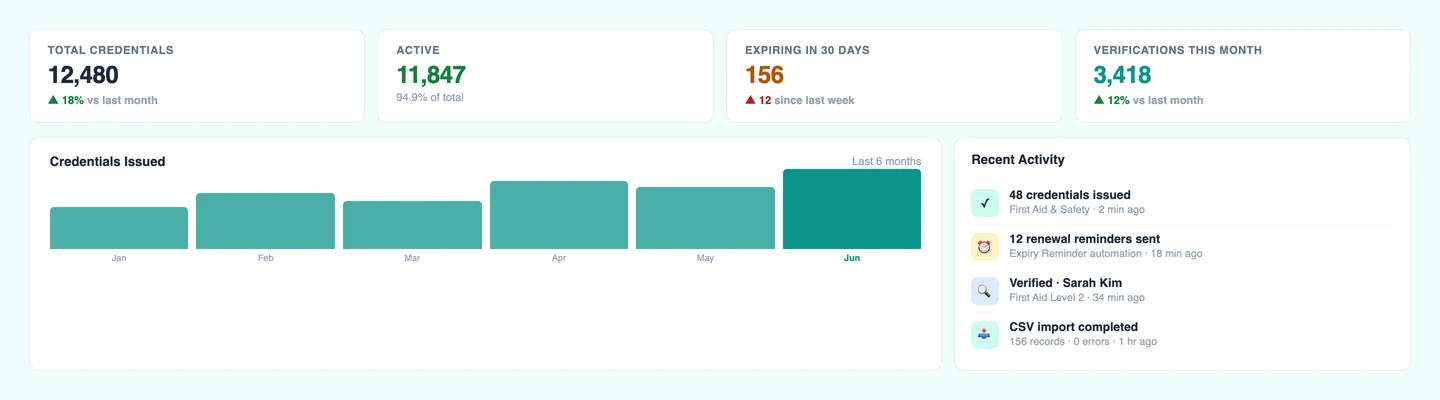
  • A dashboard with charts of what you have issued.
  • Search and filters for your credentials.
  • A public verification page, where anyone can check a credential.
  • A verification widget to embed on your own website.
  • Sign in with Google, and import credentials from a spreadsheet.

December 2024

Work on CertLister begins

  • We started building one place to issue credentials, keep track of them and let anyone check that they are genuine.

See it for yourself

Issue a credential and check it on its verification page in a few minutes.

Free plan: 10 credentials a month. No credit card.