Compliance Certificate Tracking: How to Stay Audit-Ready at Scale
Compliance certificate tracking is not the same as knowing your employees have certifications. The difference becomes clear the moment an auditor asks for documentation.
"We have everyone trained" is a claim. "Here is a filtered export of every active WHMIS certification across our three facilities, with issue dates, expiry dates, and individual verification links" is evidence. Compliance audits, regulatory inspections, and ISO reviews require evidence — and organizations that can produce it quickly tend to sail through. Organizations that have to go looking for it do not.
This guide covers what compliance certificate tracking involves, where it typically breaks down, and how to set up a system that keeps you ready at any moment — not just before a scheduled audit. For a broader look at managing certifications across your workforce, see the employee certification tracking guide.
What Compliance Certificate Tracking Actually Means
Compliance certificate tracking is the practice of maintaining current, verifiable records of every certification your workforce holds that is required by law, regulation, client contract, or organizational policy.
The key word is current. A certification that was valid twelve months ago may not be valid today. First aid certifications expire. Food handler cards need renewal. Confined space entry training has a shelf life in most jurisdictions. A compliance certificate tracking system needs to reflect real-time status — not just record what was issued.
That means the system has to do three things:
Record what everyone holds. Name, certification type, issuing body, issue date, and expiry date — for every employee, across every location.
Surface what's expiring before it expires. An expired certification is a compliance gap. A good system flags certifications that are 30, 60, or 90 days from expiry so you can act before they lapse.
Produce proof on demand. When a regulator, ISO auditor, insurance underwriter, or client asks for documentation, the answer should be retrievable in minutes — not assembled from email threads over the course of a day.
Where Compliance Tracking Breaks Down
Most organizations start with a spreadsheet. Some stay there far longer than they should.
The spreadsheet problems are predictable: someone forgets to update it when a certification renews. A new location is added and nobody transfers the records. A long-tenured employee's certifications were tracked in a separate file that only their manager knew about. An auditor asks for a specific view — all employees with expired confined space entry training across three sites — and the spreadsheet can't produce it without three hours of manual sorting.
But even organizations that move beyond spreadsheets can run into structural problems:
LMS records aren't compliance records. A learning management system tracks training completion. It knows someone finished a course — it doesn't necessarily know whether the resulting certification is still active, when it expires, or whether the certification is the specific credential a regulator will accept. Training completion is an input; compliance certificate status is the output. They're different things.
Decentralized records create gaps. When each manager or site coordinator tracks their team's certifications locally, central compliance oversight becomes nearly impossible. A compliance manager responsible for 12 sites can't know what they don't have access to.
No automated alerts means relying on memory. Expiry dates only matter if someone notices them. Without automated reminders, certifications expire quietly — and are only discovered during an audit or, worse, an incident investigation.
Industries Where Compliance Certificate Tracking Is Critical
The specifics vary by sector, but the core problem is the same across all of them: regulatory bodies and clients expect proof of compliance, not assurances.
Construction and trades: Fall arrest training, crane operator licenses, first aid, confined space entry, WHMIS (in Canada), and various jurisdictional safety certifications. Multiple subcontractors on a single site may each have different certification requirements. Certificates often expire on 1–3 year cycles.
Food service and manufacturing: Food handler cards, PCQI (Preventive Controls Qualified Individual), HACCP training. Food safety inspections under the FDA Food Safety Modernization Act (FSMA) require documented training records for key personnel. These records may need to be produced during an inspection with little notice.
Healthcare and social services: CPR and AED certification, medication administration, First Aid, and sector-specific training. Many of these are renewed annually. Healthcare organizations routinely face regulatory reviews where staff credential documentation is a primary audit focus.
Transportation: Commercial driver's licenses, dangerous goods training, driver abstract currency. Organizations in federally regulated transport may face audits from Transport Canada or the DOT that include documentation reviews.
ISO-certified organizations: ISO 9001:2015 clause 7.2 requires organizations to maintain documented information as evidence of employee competence. This includes certifications relevant to quality-affecting roles. ISO auditors routinely review training and certification records as part of their assessment.
The regulatory landscape in any of these sectors can change. What's consistent is the principle: if your organization works in a regulated environment, the burden of proof for compliance is on you.
What a Compliance Certificate Tracking System Needs
A system that keeps you genuinely audit-ready needs to do more than store records. It needs to:
Centralize everything in one place. All certification types, all employees, all locations. The value of a compliance tracking system comes from its completeness. A system that tracks most certifications is less useful than one that tracks all of them.
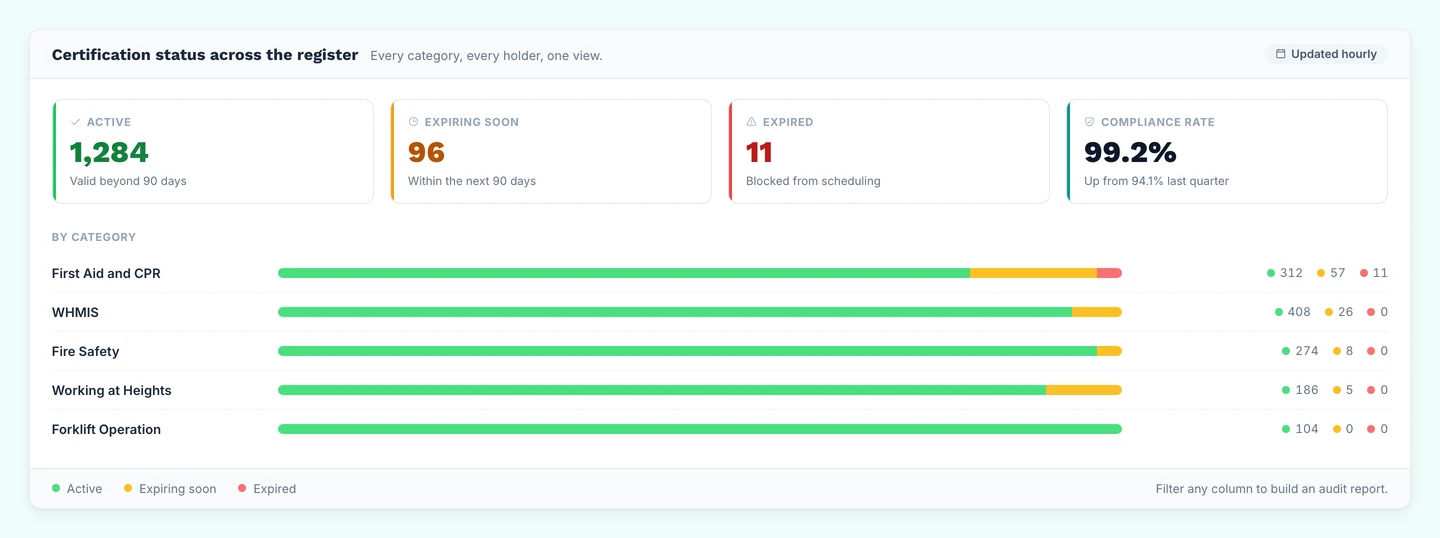
Enforce expiry tracking. Every certificate record should have an issue date and an expiry date. The system should automatically update status based on those dates — and surface what's expiring before you have to go looking. See certificate expiration tracking for a detailed guide on building this out.
Send automated reminders. When a certification is 60 days from expiry, the employee should receive a reminder automatically, and the compliance team should see it coming. Not because someone on the compliance team put it in their calendar — because the system sends it.
Filter and export for audits. The compliance manager needs to be able to filter by certification type, status, location, and date range — and export the result as a report. "Show me all active fall arrest certifications at Site 3" should be a 30-second task.
Issue verifiable credentials. For certifications that may be checked by third parties — clients, inspectors, other contractors on a job site — the record should include a verification link or QR code that anyone can use to confirm the certification is active. This removes the HR team from the verification loop entirely — and is particularly valuable for employee certification tracking teams managing large, multi-site workforces.
CertLister's compliance and certification tracking system covers the expiry side of this list: one register, status by date, and reminders to each holder on the schedule you set.
Setting Up Compliance Certificate Tracking in CertLister
CertLister is built around the compliance tracking workflow. Here's how to set it up for your organization.
Step 1: Create a Category for Each Certification Type
In CertLister, certifications are organized by category. Each category represents a certification type — WHMIS, First Aid, Food Handler, Confined Space Entry, etc.
Create one category per certification type, not one per cohort or session. This keeps records organized so you can filter by certification type when you need a compliance view.
For each category, set a default expiry rule — for example, "expires 2 years after issue date." This pre-fills the expiry date when creating records, reducing manual entry errors.
Step 2: Import Your Existing Records
If you have existing certification records in a spreadsheet, CertLister's CSV import handles the migration. The only required column is Recipient Name; new credentials also need Title (unless the category has a default title) and Issue Date. Recommended additions: Recipient Email, Expiry Date, and any compliance-specific fields (certificate number, issuing body, course code).
Add a Category column to put each row in the right category, or import one certification type at a time. The validation step flags any rows with missing required fields or malformed data before they're committed — fix those rows and re-import.
Step 3: Configure Automated Expiry Reminders
Once your records are in the system, set up workflow automations for each category (the free plan includes one automation, Basic three, and Pro as many as you need):
- 60-day reminder — sent to the employee when the certification is 60 days from expiry
- 30-day reminder — a follow-up for anyone who hasn't renewed
- Notification once expired — alerts your admins once a certification has lapsed (turn on Auto-expire for the category so the rule runs), so the gap doesn't go unnoticed
These automations run continuously. Once configured, the compliance team's role shifts from chasing renewals to reviewing exceptions.
Step 4: Configure Verification for External Use
Each credential in CertLister has a unique verification page — a public URL that shows the certification details, issuer, dates, and current status. This page is live as long as the record exists.
For certifications that field staff carry on-site, include the QR code on the printed credential. A supervisor, inspector, or client representative can scan it and confirm the certification is active without contacting your HR or compliance team.
Responding to an Audit
This is where a well-configured compliance tracking system pays off.
When an auditor requests documentation, you're typically asked for one or more of:
- A list of all employees with a specific certification type and their current status
- Documentation for an individual employee's certification history
- Proof that a specific certification is currently active
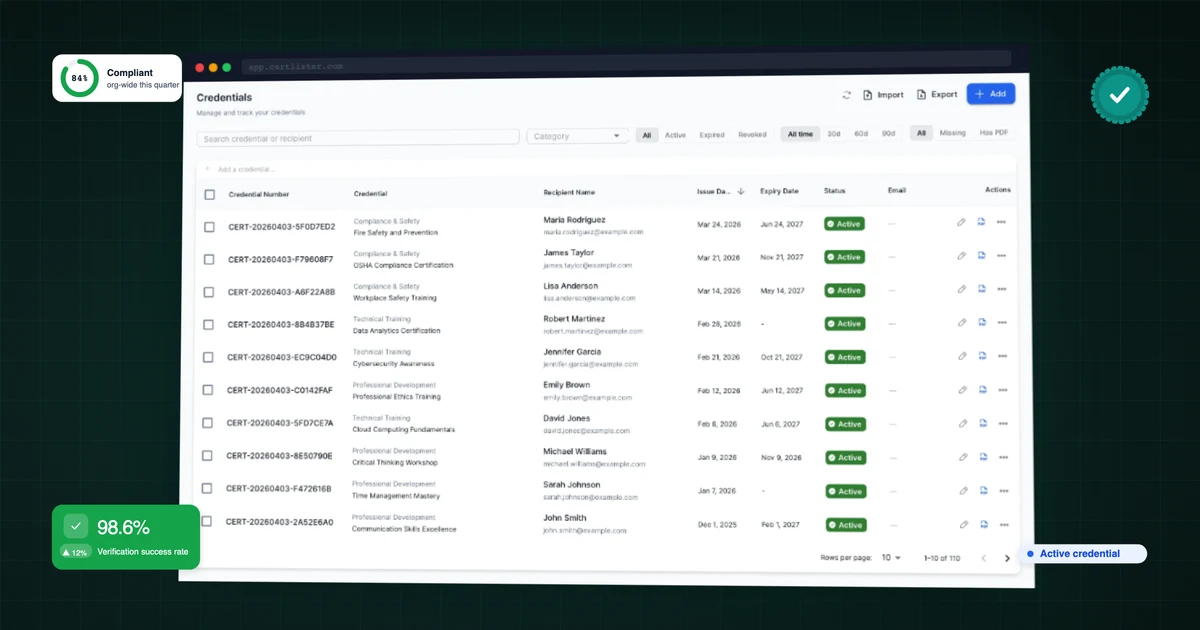
With CertLister, the first request takes about 30 seconds: filter by category (e.g., WHMIS), filter by status (Active), and export to CSV. The export includes names, issue dates, expiry dates, and credential numbers.
For individual documentation, share the verification URL for the credential. The auditor can review it directly — without needing access to your CertLister account.
For organizations that face unannounced inspections (common in food safety and construction), this response time matters. An auditor who walks in and is handed a filtered export within minutes is a different conversation from one who waits two hours while someone pulls records together.
Keeping Records After Employees Leave
Compliance record-keeping obligations don't end when an employee leaves. In some jurisdictions and industries, you're required to retain training and certification records for a defined period after employment ends — to establish what qualifications a person held during their tenure, or to provide documentation in the event of an incident.
In CertLister, deactivating or removing an employee from your active roster doesn't delete their credential records. Historical records remain accessible and filterable. You can search by name or email to retrieve a complete certification history for a former employee when you need it.
The Standard You're Aiming For
A compliance certificate tracking system isn't a pass/fail situation — it's a spectrum. At one end: a spreadsheet someone updates when they remember to, with no expiry alerts and no audit trail. At the other: a real-time system where every certification is tracked, every expiry is visible 60 days in advance, reminders run automatically, and any audit request can be answered in under five minutes.
The gap between those two ends isn't a large technology investment. It's largely a configuration problem — getting your existing records into a centralized system with proper expiry dates and automations turned on. Most organizations can close the gap in an afternoon.
What you get on the other side is not just audit readiness. It's the ability to manage compliance proactively instead of reactively — catching the lapsed certification before the auditor does, not after.
If your organization tracks compliance certificates in a spreadsheet — or in no central system at all — the single most impactful change you can make is getting expiry dates into a system that surfaces them automatically and sends reminders on your behalf. That one change removes most of the audit risk.
See every expiry date before it passes
Import your records from a CSV file. CertLister lists what expires next and can remind each holder by email.
Free plan: 10 credentials a month. No credit card.