How to Choose a Training Records Management System
Someone on your team just spent four hours reconstructing a certification record for an employee who left eight months ago, because an insurance auditor wanted proof the person held a current WHMIS certification during a specific incident window. The spreadsheet had three versions floating around, and nobody could say which one was current. That's usually the moment "we should find something better" turns from a someday idea into an actual project.
The hard part isn't admitting the spreadsheet has failed — you already know that. It's that every vendor's homepage looks the same: a dashboard screenshot, a row of checkmarks, a "start free" button. The feature lists all claim to do the same five things. Picking the wrong training records management system doesn't just waste a subscription — it costs you a migration project, and you end up back where you started with a login screen this time.
This guide is for the evaluation stage: after you've decided a purpose-built system is worth buying, and before you sign anything. It covers what to actually check, what to ask in a demo, and the problems that don't show up until you're three months in.
Start With the Job, Not the Feature List
Every vendor will show you a dashboard in the sales call. The dashboard is not the product. The product is what happens automatically between the moment a certification is entered and the moment someone needs to act on it — a renewal reminder sent, a status updated, an auditor's question answered — without a person remembering to make it happen.
Before comparing vendors, write down the specific job the system needs to do in your organization. Not "track certifications" — every product on the market claims that. Something closer to: "Alert the safety manager 60 days before a fall arrest certification lapses, and let an external auditor confirm any employee's current status without calling our office." That sentence is testable against a live demo. A generic feature list isn't.
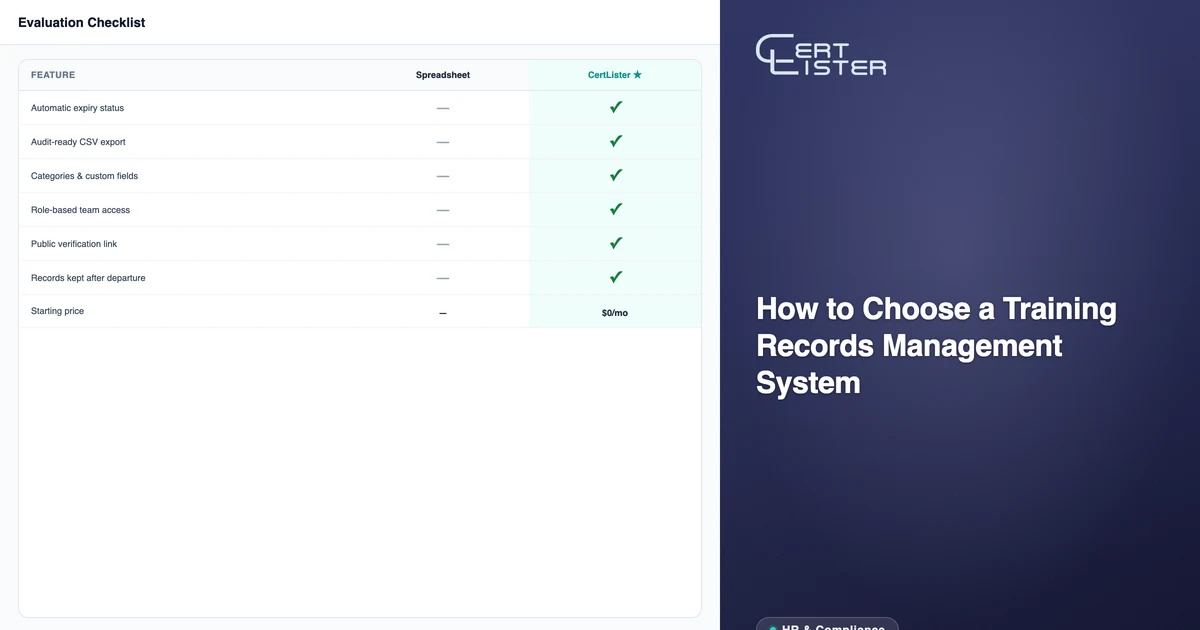
The 7 Things to Check Before You Buy
Expiry tracking that updates itself. A field labeled "expiry date" isn't expiry tracking — it's a date stored in a database. Ask whether status changes automatically when the date passes, and whether you can filter the full list by Active, Expiring Soon, and Expired. If someone has to manually flip a status, the system is a filing cabinet with a nicer interface.
Audit-ready exports, not just storage. When an auditor asks "show me everyone with a current confined space certification at Site 3," how long does it take to produce that answer? In a well-built system, it's a filter and a CSV export — under a minute. See our guide on preparing for a training compliance audit for what auditors actually request and how the response should look.
Categories and custom fields that match how you're actually organized. Your certifications aren't one flat list — they're grouped by type, department, or regulatory requirement, and each type probably needs its own fields (instructor name, course code, assessment score, site location). A system that only offers a single generic record form will fight you the moment your data gets specific.
Role-based access for more than one person. If your organization has more than one person touching certification records, you need permission tiers — someone who can issue and delete, someone who can add and edit, someone who can only view. Without that, you're back to shared spreadsheet chaos, just inside a paid product.
Public verification that doesn't route through your inbox. A PDF on a shared drive proves nothing — anyone can open it in an editor and change the name. Look for a public verification link attached to every record, so a client, regulator, or new employer can confirm a certification is genuine and current without emailing your team or calling your office.
A migration path for the records you already have. If getting your existing data in requires a developer, a professional services contract, or weeks of manual re-entry, that cost belongs in your evaluation — not as a surprise after you've committed. Ask for a CSV import demo with your own file, not a sample dataset. Our guide on replacing a spreadsheet for certification tracking covers what a clean migration actually involves.
Retention after someone leaves. In many regulated industries, OSHA training recordkeeping and similar frameworks expect you to retain proof of what training a person completed during their employment — sometimes well after they've left. Confirm that removing someone from your active roster doesn't delete their certification history. It should stay searchable by name or email indefinitely.
Questions to Ask in the Demo
Vendor demos are scripted around what looks good, not around your specific gaps. Bring your own questions:
- "What happens automatically when a certification expires — and what happens if I do nothing?"
- "Can an external auditor or client confirm someone's certification status without logging in?"
- "How long does it take to import 300 existing records from a CSV, and what happens to the rows that don't match?"
- "If I remove someone from my team next year, can I still pull their full certification history?"
- "Can I limit what a manager can edit versus what only an admin can delete?"
- "What does the free plan actually include, and what breaks the moment I go over it?"
If a sales rep can't answer one of these directly, that's information too.
Red Flags That Show Up After You've Signed
Some problems don't surface in a 20-minute demo. They surface in month three, when the free trial excitement has worn off and the system has to carry real weight.
- "Automation" that turns out to be a scheduled email digest, not a reminder tied to each individual record's expiry date
- Verification pages gated behind a login — which defeats the entire point for an auditor or a client who doesn't have an account
- No usable free tier, meaning you can't test the real workflow with real data before paying anything
- A flat, uncategorized list with no way to organize by department, certification type, or custom fields
- An import process that requires a developer or a paid onboarding call to complete
- Pricing that scales per verification or per lookup — which punishes you specifically for the audits and background checks the system is supposed to make easier
Can You Get Your Data Back Out?
Every vendor evaluation focuses on getting data in. Almost nobody asks about getting it back out, until they need to switch systems and discover their records are trapped behind a proprietary format or an API that requires a developer to touch.
Before you commit, ask for a full export of a test record — not a summary report, the actual underlying data: names, dates, categories, custom fields, and status history. If the answer is "we don't support that" or "you'd need to contact support for an export," treat that as a serious constraint, not a minor inconvenience. A system confident in its own value doesn't need to make leaving difficult. CSV export that you can open and audit yourself is the baseline, not a premium feature.
This matters more in this category than most SaaS purchases, because the data you're storing — proof that a specific person held a specific certification on a specific date — may be the only copy that exists once the original PDF from the training provider is lost or the provider itself is no longer operating.
Pilot Before You Migrate Everything
Full migrations fail more often from scope than from the product itself. Importing 2,000 records across 15 certification types in one afternoon, before anyone on the team has used the system, tends to surface every workflow gap at once — and by then you're already committed.
A better sequence: pick one certification category, ideally one with a near-term renewal cycle so you'll see the reminder automation fire within the first month. Import just that category. Configure its expiry rules and reminder schedule. Run it in parallel with your existing spreadsheet for two to four weeks. If the filtered export answers an audit-style question in under a minute and the reminder actually reaches the right person, expand to the next category. If it doesn't, you've learned that on 50 records instead of 2,000.
This staged approach also surfaces whether the vendor's free plan is generous enough to run a real pilot, or whether it's scoped so narrowly that you can't meaningfully test the workflow without paying first — which is itself useful information about how the vendor treats prospective customers.
What a Fair Price Looks Like
Pricing in this category varies widely, but a reasonable benchmark: a mid-sized organization tracking a few hundred employee certifications across multiple departments should expect to pay somewhere in the range of a low monthly SaaS subscription, not an enterprise contract with a sales cycle attached. On CertLister's Basic plan, for example, a manufacturing company tracking 300 employee certifications across 8 departments pays $19/month — less than the cost of one hour of admin time per audit cycle, and considerably less than the SHRM-documented cost of getting record retention wrong.
A free plan you can actually run real records through — not a 14-day trial with a countdown clock — is the best evaluation tool available. If a vendor won't let you import your own data and test the workflow before you pay, that's worth asking why.
The Checklist
Before you sign anything, confirm the system:
- Updates certification status automatically as expiry dates pass
- Produces a filtered, exportable audit report in under a minute
- Supports categories and custom fields specific to your certification types
- Offers role-based access for more than one team member
- Gives every record a public verification link that works without a login
- Imports your existing spreadsheet without a developer
- Retains certification history after someone leaves your organization
If a vendor checks all seven and lets you test it on a free plan with your own data, you've found a system worth migrating to.
CertLister is a digital credential platform built for HR and compliance teams. Track employee certifications, automate expiry reminders, and produce audit-ready exports in a click — with a free plan you can test using your own records. Start free →
See it in action. No card, no commitment
Join schools, companies, and training centers using CertLister. Free plan available, no credit card required.
Get Started Free