Best Credly & Accredible Alternatives in 2026 (5 Compared)
The best digital credential platform depends on who you issue to and how many. A certification body whose badges employers look up needs something different from a training company that sends 300 certificates after every course, or a university that issues badges through its LMS.
This comparison covers five platforms: CertLister, Credly, Accredible, Certifier, and Parchment Digital Badges (the product once called Badgr, then Canvas Credentials). CertLister is our product, so we tried to say plainly where the others are stronger. We checked each competitor's own pricing and product pages on October 16, 2026, and we link the pages we used. Prices and plans change, so confirm with the vendor before you buy.
Prices are in the vendor's own currency: CertLister bills in Canadian dollars, the others quote in US dollars.
The Short Answer
- Bulk issuing with automatic email delivery, at a flat price: CertLister, or Certifier if you issue fewer than 250 credentials a year.
- Badges that employers already recognize: Credly.
- Programs run from an LMS, with pathways and analytics: Accredible.
- Universities and schools on Canvas or Blackboard: Parchment Digital Badges, Accredible or Credly.
- Conference and event certificates sent from your own email address: Certifier.
- Credentials that expire, such as safety and compliance training: CertLister.
The sections below explain each pick.
1. CertLister
Best for: training providers, HR and compliance teams, and associations that issue credentials in batches, need to know when each one expires, and want a published price with no sales call. CertLister's certification tracking and verification software covers design, issuing, expiry tracking and public verification in one platform.
CertLister covers the whole life of a credential: design it, issue it one at a time or from a spreadsheet, email it, remind the holder before it expires, and let anyone check it on a public verification page.
Pricing:
| Plan | Price | Credentials |
|---|---|---|
| Free | CA$0/month | 10 a month |
| Basic | CA$19/month (CA$15/month annually) | 1,000 a month |
| Pro | CA$49/month (CA$39/month annually) | Unlimited |
Strengths:
- Every plan includes the drag-and-drop Design Studio, PDF credentials, digital badges, printable wallet cards, expiry reminders, signed Open Badges 3.0 files, a recipient portal and workflow automations (1 on Free, 3 on Basic, unlimited on Pro)
- Bulk issuing: import up to 2,000 spreadsheet rows at a time, then generate PDFs and send emails for up to 500 credentials per action, in the background
- An email delivery report on every plan: how many emails were sent, the delivered and bounce rates, and a log of every email. Bulk sends skip any address that bounced until someone corrects it
- Expiry tracking: each category sets how long its credentials last, holders get reminders on up to five dates before expiry, and admins and managers get a Monday digest of what expires in the next 30 days
- Recipients don't need an account. The email links to a public verification page, where they can download the PDF or add the credential to LinkedIn
- Pro is CA$49/month however many credentials you issue
- On Pro: REST API and webhooks, a custom domain, and publishing a verification page you design yourself (you can build and preview one on any plan)
Limitations:
- Emails come from
no-reply@certlister.com. You can't send from your own domain; the sender name shows your organization's name on paid plans - No ready-made LMS connector. Moodle connects through a free Moodle plugin and our webhooks (Pro), or by CSV export
- Wallet cards are printable PDFs, not passes for a phone's wallet app
- No SSO/SAML, no pathways, and no network of employers browsing badges
- A smaller and newer company than Credly or Accredible
Bottom line: CertLister fits organizations that issue in batches and track expiry dates, and want every feature on a published, flat price. If you need an LMS connector, SSO or sending from your own email domain, look at the others first.
2. Credly
Best for: large certification bodies and enterprises whose badges employers already know, such as IT and cloud certifications.
Credly is the largest platform in this comparison. Its own figures are "4,000+ organisations", "48 M+" people who have earned a Credly badge and "110 M+" credentials. It is a Pearson product.
Pricing: Not published. Credly's FAQ says to schedule a demo, and that an issuer "must go through a legal contracting process" before issuing, so there is no self-serve plan and no free plan. Badges bought for a contract year that go unused expire at the end of it. Vendr, a software-buying service, reported a median of US$8,000 a year across 43 purchases (page updated February 2026).
Strengths:
- The best-known badge brand, with a large earner network that employers search
- Integrations with LMS and learning platforms, including Canvas, Moodle, Skilljar, Bridge, Degreed and EdCast, plus a REST API
- Pathways that unlock a badge when earlier ones are earned
- Analytics and benchmarks against other Credly issuers
- ISO 27001 and ISO 27701, by Credly's own statement
Limitations:
- No published price, a contract to sign, and a sales process before you can issue
- Earners must create a Credly account to accept a badge. Credly's FAQ answers "Yes, we require earners to have their own accounts"
- No white labelling. The FAQ says "Credly does not offer white labelling because we are a multi-tenant platform"
- Built around badges. A PDF certificate is available but secondary
- Its Open Badge 3.0 page describes uploading and verifying OB 2.0 and 3.0 badges issued elsewhere. We found no page saying Credly issues OB3 itself
Bottom line: Credly makes sense when employers already look for your badge on Credly and the budget allows a contract. For most training providers, the account requirement and the price are hard to justify.
3. Accredible
Best for: course providers, associations and universities running programs from an LMS, who want pathways, analytics and a branded recipient site.
Accredible says it has issued "201M+" credentials for "2,300+" universities, associations and technology companies. It added Open Badges 3.0 and W3C Verifiable Credentials for all customers in January 2026.
Pricing: Published in part. The Launch plan "Starts at $45 /month" on a "12-month term; billed monthly", with "50 recipients to get started". Accredible prices by recipient, not by credential: each recipient can receive unlimited credentials in a year. The Connect and Growth plans are quoted. No free plan or trial is listed.
Strengths:
- A drag-and-drop editor for certificates and badges, plus ready-made templates
- Spreadsheet upload (CSV, XLS or XLSX) and auto-issuing from an LMS or course platform. The pricing page names Moodle, Canvas, Zapier, Thinkific, WordPress and Kajabi
- Pathways on Connect and above, where Accredible also lists Apple Wallet / Google Wallet cards
- Expiry dates that expire credentials automatically
- A vanity URL, branded recipient emails and a branded recipient site, as add-ons or on higher plans
- Recipients can accept a credential without logging in
Limitations:
- Only the entry plan has a published price, and it is a 12-month commitment
- Many features (API on Launch, vanity URL, white labelling) are add-ons or need a higher plan
- We found no rules-based automation builder. Automation comes from LMS triggers, email campaigns, pathways and Zapier
Bottom line: Accredible is the strongest choice here for LMS-connected programs that want pathways, analytics and a branded recipient site, and can commit to a year. Its per-recipient pricing suits programs that issue several credentials to the same people.
4. Certifier
Best for: course creators, event organizers and small teams that want to start free and pay as their yearly volume grows.
Certifier is self-serve, with a free plan and paid plans priced by yearly volume. It says it is trusted by "2,000+" organizations.
Pricing: Published, in US dollars. The Starter plan is free ("stays free forever") with an annual issuing limit of 250 certificates and badges. Professional and Advanced are priced by how many credentials you issue a year, and Enterprise is quoted. Paying yearly saves 15%.
Strengths:
- A free plan with Open Badges 3.0 badges and a verification page for every credential
- A template editor with drag-and-drop layers and a large template library
- Spreadsheet upload and a mass sender for bulk issuing, plus Zapier, Make, an API and webhooks
- On Professional: sending from your own email address, expiry dates with reminder emails before expiry, LMS integrations including Canvas and Moodle, and wallet cards that Certifier says recipients can save to Apple Wallet or Google Wallet
- On Advanced: your own domain for credential pages, pathways and SAML SSO
- Recipients don't need an account
Limitations:
- The free plan has no expiry reminders and no custom email sender
- The price rises with yearly volume, and branding features are paid add-ons
- Your own domain, pathways and SSO are on Advanced, which starts with a demo
Bottom line: Certifier is a good fit for small and seasonal volumes, and its Professional plan sends credential emails from your own address without a sales call. If you issue thousands of credentials a year, compare its volume price with a flat plan.
5. Parchment Digital Badges (formerly Badgr and Canvas Credentials)
Best for: colleges, universities and schools on Instructure's Canvas, and corporate learning teams that want badges tied to an LMS.
Badgr became Canvas Credentials, and on October 31, 2025 it was renamed Parchment Digital Badges. Both Canvas and Parchment belong to Instructure. The free version is gone: Instructure stopped creating free issuers on June 30, 2025, and existing free issuers stayed open until December 31, 2025. Learners keep free access to their badges.
Pricing: Not published. The product page offers a demo.
Strengths:
- Badges issued automatically from Canvas, with connections to Blackboard, Moodle and D2L
- Certified by 1EdTech as an Open Badges 3.0 issuer
- Pathways of stackable badges
- Expiry dates with reminders before a badge expires
- Learners keep their badges in a free Backpack
Limitations:
- Paid plans only, by quote
- Built around badges. Printable certificate templates exist, but we found no certificate designer
- Learners use a Backpack account
- SSO costs extra
Bottom line: If your institution runs on Canvas, this is the natural option. If you don't use Canvas, or relied on the free Badgr plan, you are choosing from the other four anyway.
Bulk Issuing and Email Delivery
Most organizations issue in batches: a class finishes, an event ends, a year of training records needs to go out. Here is what to check before you choose a platform for that.
How many rows one upload takes. CertLister imports up to 2,000 rows at a time and runs PDF generation and email sending in the background, up to 500 credentials per action. All five platforms in this comparison take spreadsheet uploads.
Whether you can see what bounced. A credential nobody received is a support ticket later. CertLister's email report shows delivered and bounce rates and lists the recipients whose email bounced, failed or was marked as spam on every plan, and bulk sends skip those addresses until someone corrects them. Certifier shows each email's status. Ask the others how they report bounces before you buy.
Who the email comes from. Email from your own address is more likely to be opened, and less likely to be mistaken for spam, than email from a platform you have never heard of. Certifier's Professional plan sends from your own address. Accredible lets higher plans brand the recipient emails. Credly sends from its own platform and doesn't offer white labelling. CertLister sends from no-reply@certlister.com, with your organization's name as the sender on paid plans.
What triggers the send. CertLister can email a credential, with its PDF, the moment it is issued, through an automation. Accredible, Credly and Parchment Digital Badges can issue automatically from an LMS. Certifier connects through Zapier, Make and its API. Our guide to bulk credential generation walks through a batch from spreadsheet to sent email.
For Universities and Schools
A university usually needs four things: issuing from its LMS, Open Badges 3.0, single sign-on for staff, and pathways that stack smaller badges into a larger one.
- Parchment Digital Badges is the most direct choice on Canvas, and it is 1EdTech-certified for Open Badges 3.0.
- Accredible says it "sits downstream of your LMS, not in place of it", and it adds pathways, digital transcripts and branded recipient pages.
- Credly suits programs whose badges students will show to employers who already use it.
- Certifier reports that "520+ higher ed institutions" have issued with it, and it puts SSO and pathways on its Advanced plan.
CertLister has no LMS connector, no SSO and no pathways, so it is a weak fit for a campus-wide badge program. It fits a single department, continuing-education office or training center that issues certificates from a list and wants a public page anyone can check. Our guide to digital badges versus PDF credentials covers which format a program needs.
For Conferences and Events
Event certificates have their own needs. They go out all at once, often to people who will never log in to anything. Most of them are certificates of attendance, and some carry continuing-education credits.
What matters most is issuing from the attendance list in one batch, sending from an address attendees recognize, and including the details an accrediting body asks for, such as hours and session titles. Certifier is built for this case, and its Professional plan sends from your own address. CertLister handles the batch and the details (each category can carry its own fields, such as CPE hours), on a flat price that doesn't change with the size of the event, but it sends from its own address. Our guide on how to generate certificates for event participants covers attendance rules and what a certificate of attendance should include.
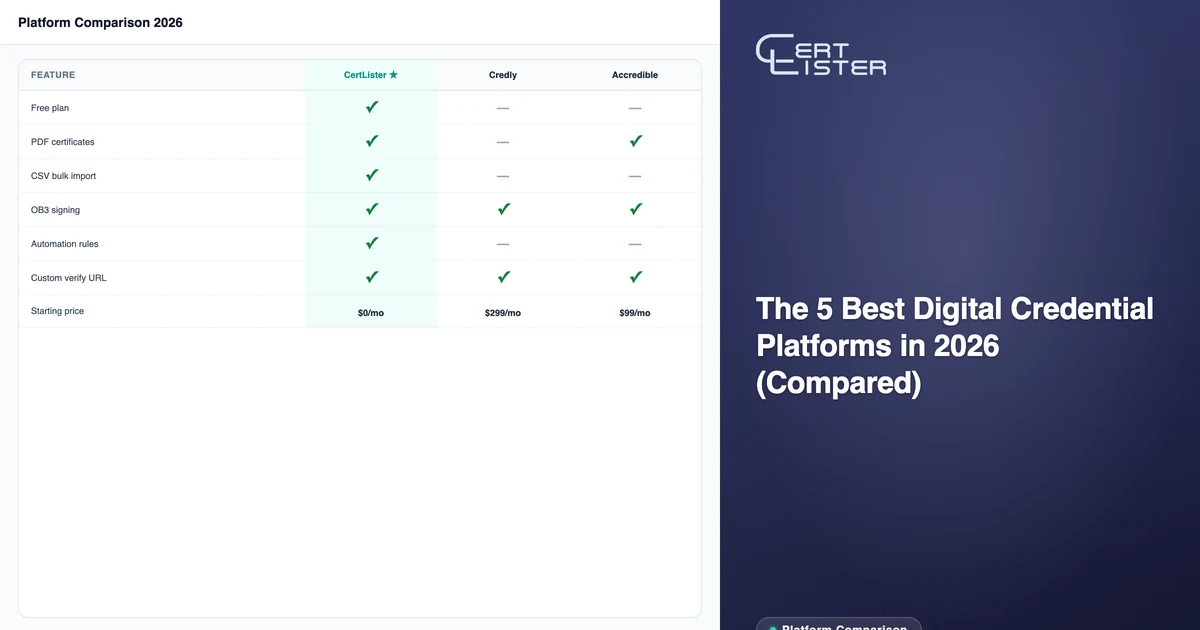
Side-by-Side Summary
| CertLister | Credly | Accredible | Certifier | Parchment | |
|---|---|---|---|---|---|
| Free plan | ✅ 10 a month | ✗ | ✗ | ✅ 250 a year | ✗ (ended 2025) |
| Published prices | ✅ | ✗ | Entry plan only | ✅ | ✗ |
| Pricing basis | Flat per month | Contract | Per recipient | Yearly volume | Contract |
| PDF certificates | ✅ | Secondary | ✅ | ✅ | Printable templates |
| Digital badges | ✅ | ✅ | ✅ | ✅ | ✅ |
| Drag-and-drop designer | ✅ | Certificates only | ✅ | ✅ | Not found |
| Expiry reminders | ✅ All plans | ✅ | ✅ | Professional+ | ✅ |
| Delivery and bounce report | ✅ All plans | Ask | Ask | ✅ | Ask |
| Email from your own address | ✗ | ✗ | Branded emails | Professional+ | Ask |
| Wallet | Printable PDF card | ✗ | Apple / Google, Connect+ | Apple / Google, Professional+ | Not found |
| Open Badges 3.0 issuing | ✅ All plans | Not stated | ✅ | ✅ All plans | ✅ |
| LMS connectors | ✗ (Moodle via webhooks) | ✅ | ✅ | Professional+ | ✅ |
| API / webhooks | Pro | ✅ | Add-on on Launch | ✅ All plans | API |
| SSO | ✗ | ✅ | ✅ | Advanced | Extra fee |
| Pathways | ✗ | ✅ | Connect+ | Advanced | ✅ |
| Recipient account needed | ✗ | ✅ Required | ✗ | ✗ | Backpack |
| Sign up without a sales call | ✅ | ✗ | Launch only | ✅ | ✗ |
"Ask" and "Not found" mean we found nothing on the vendor's own pages either way.
How to Choose
Choose CertLister if you issue in batches, need expiry reminders and a delivery report on every plan, and want one flat monthly price with no sales process.
Choose Credly if employers already look for your badge on Credly, and a contract and earner accounts are acceptable.
Choose Accredible if your programs run from an LMS and you want pathways, analytics and a branded recipient site, and can commit to a 12-month term.
Choose Certifier if you issue a few hundred credentials a year, or need event certificates sent from your own email address.
Choose Parchment Digital Badges if you are a school or university on Canvas and want badges issued from course completions.
For the basics behind these choices, read what a digital credential platform is and when you need one.
CertLister is a digital credential platform for training providers and the organizations that rely on their certificates. Design, issue, track and verify credentials on one flat monthly price, with expiry reminders and delivery reports on every plan. Start free →
See it for yourself
Issue a credential and check it on its verification page in a few minutes.
Free plan: 10 credentials a month. No credit card.