Full Feature Overview
Issue, Track, and Verify Certifications: See How Each Piece Works
Every feature CertLister offers, explained with screenshots. Pick a section or scroll through; everything links to a free account you can try today.
Issue, Track, and Verify: All in One Place
CertLister manages the full credential lifecycle. Generate professional PDFs, automate expiry reminders, and let anyone verify in seconds, with no spreadsheets and no manual follow-up.
Issue
Create a category, then add recipients one by one or bulk-import from a CSV. Branded PDFs are generated and ready to send in seconds.
Track
The system automatically flags expiring credentials and sends reminders, so nothing slips through. Monitor the full lifecycle from a single dashboard.
Verify
Recipients share a link. Employers verify in seconds — no login, no account, no friction.
Credential Verification
Public Verification That Runs Without You
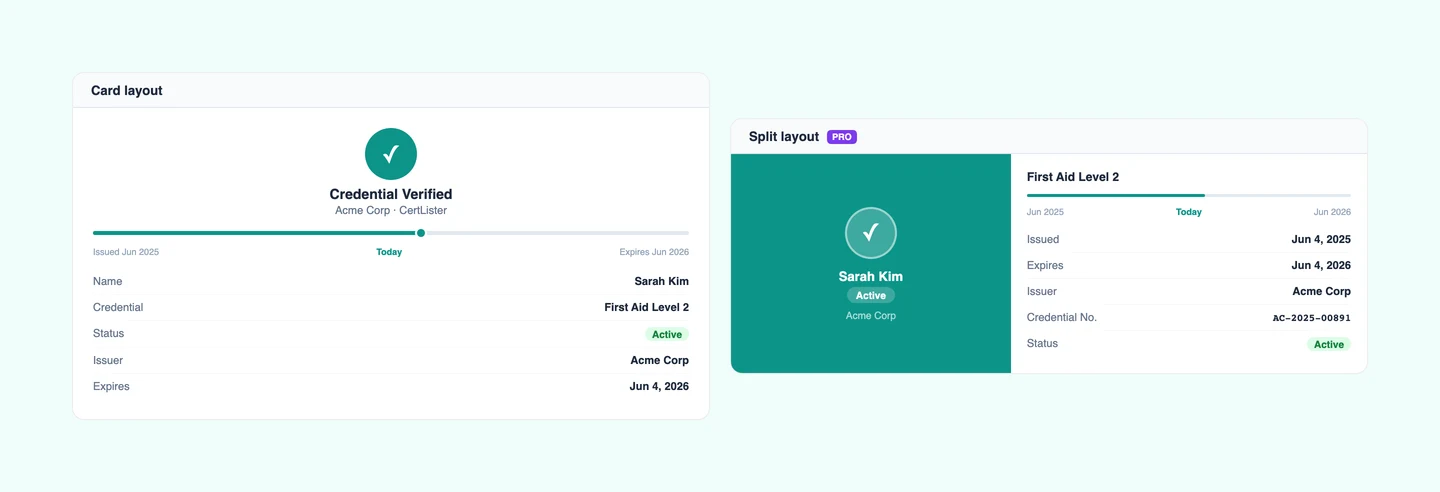
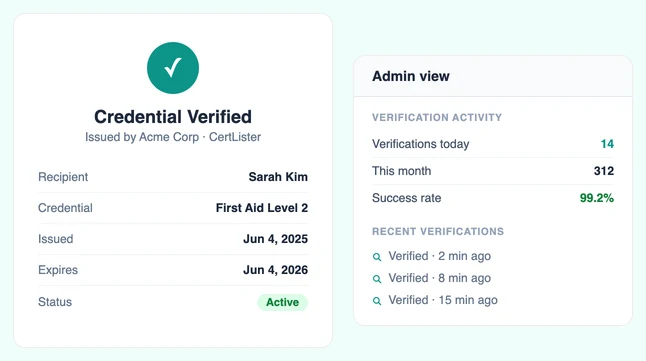
Every credential gets a unique link. Recipients share it. Employers, licensing boards, and auditors check it themselves — no login, no email to you, no office hours required.
See the full certificate verification system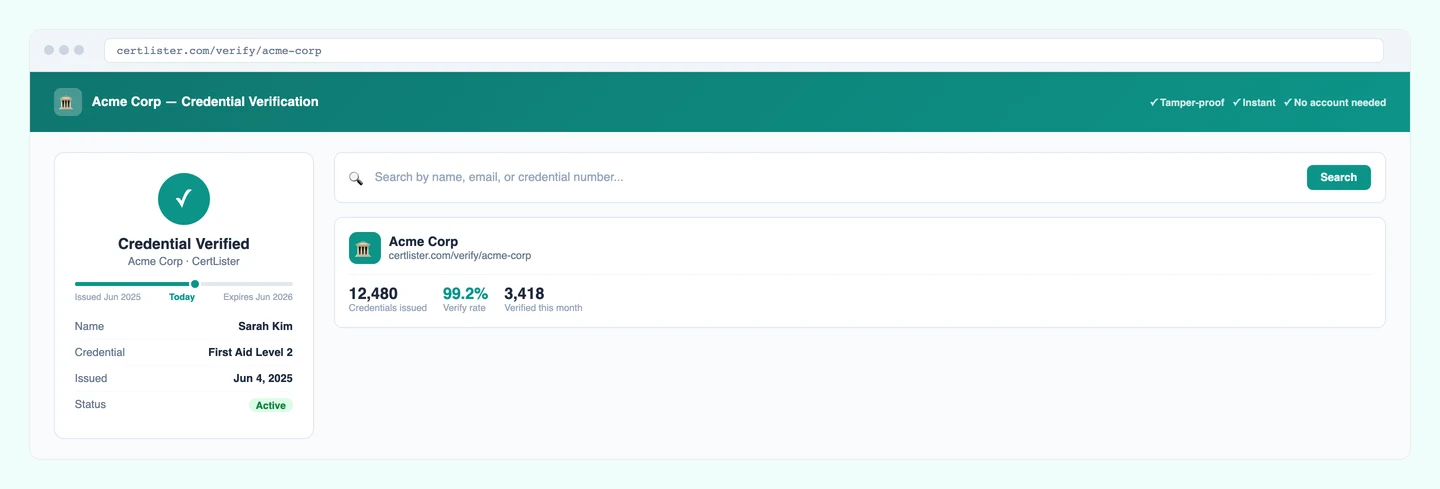
Instant Public Verification
Anyone can verify a credential by entering the credential number or recipient name. Results appear instantly with all the details. No login or account required, 24/7.
- Search by credential number or name
- Shows credential details, issue date, and status
- Scan the QR code on any PDF to verify instantly, no typing required
- Works round the clock, even when your office is closed
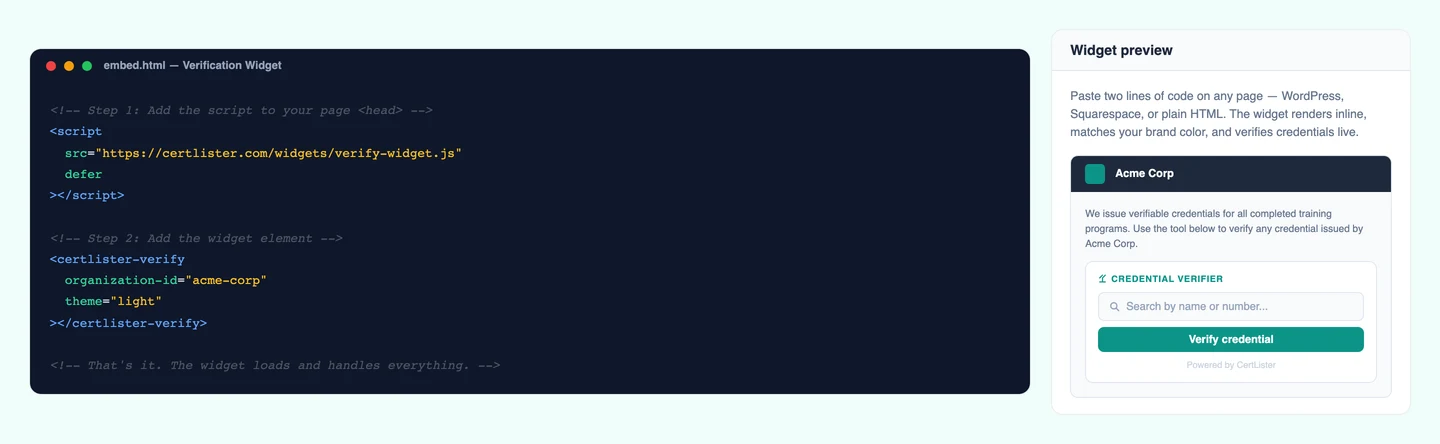
Embeddable Verification Widget
Add a verification box to your school's website. Visitors can verify credentials without leaving your page, which builds trust and shows you stand behind your programs.
- Copy a simple code snippet, paste anywhere
- Customizable to match your organization's branding
- Mobile-friendly and fast-loading
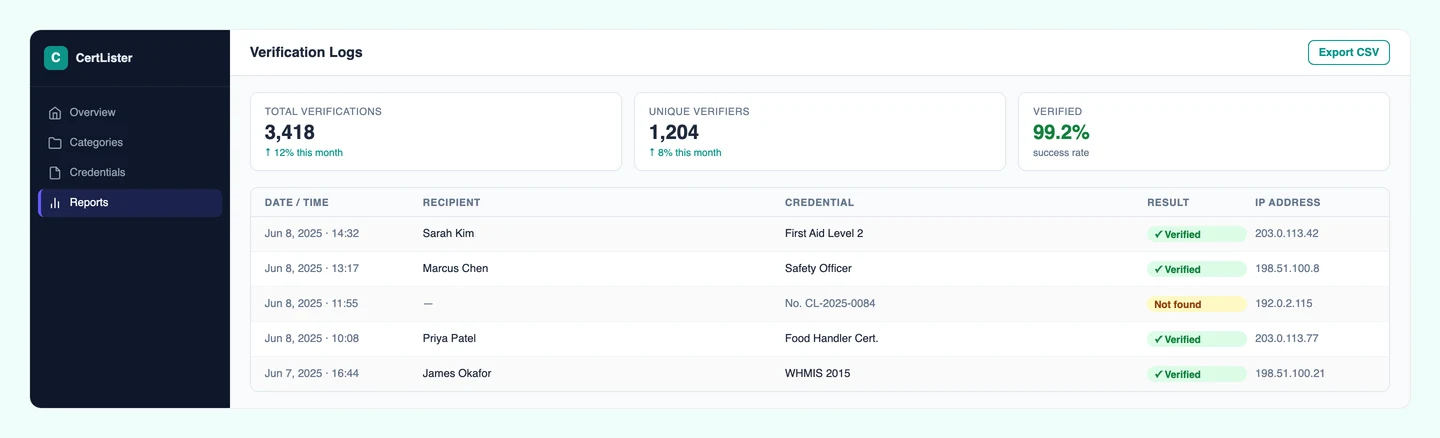
Verification Logging
Every verification gets recorded with the date, time, and who checked it. When auditors ask "How many times was this credential verified?" you'll have the answer instantly.
- Automatic logging of every verification attempt
- IP address tracking for security monitoring
- Export logs as CSV for compliance reports
Pro Feature
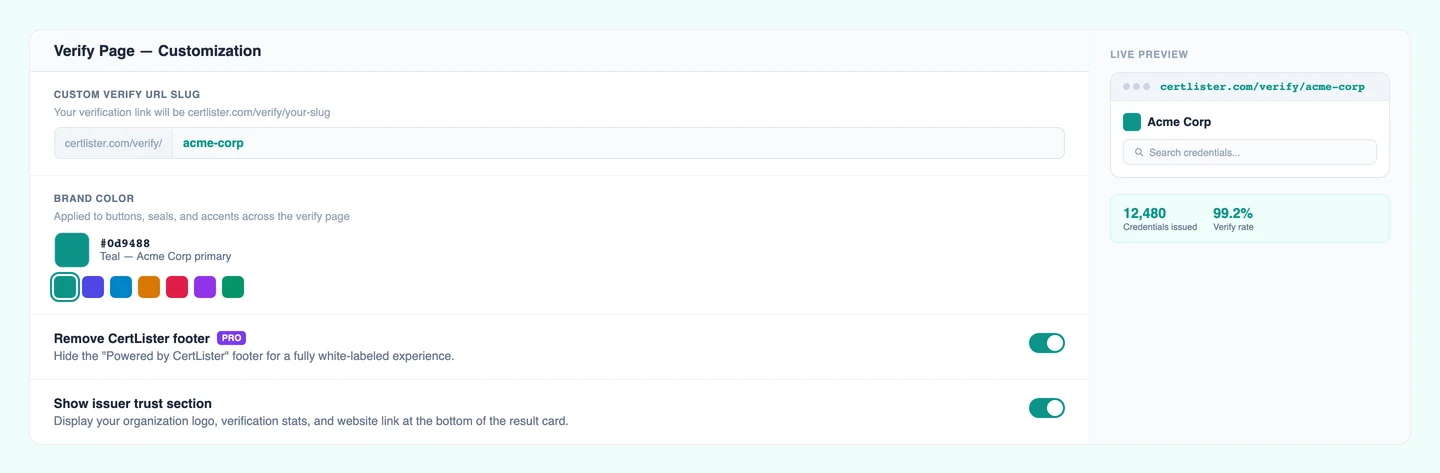
Make the Verify Page Truly Yours
Pro organizations get full control over how their verification page looks and what it shows. Brand it, customize it, and tailor it per credential category.
- Custom verify URL — share
certlister.com/verify/your-orginstead of a random ID - Organization branding — your logo and colors on every verify card
- Per-category field control — choose which fields appear on the verify card, and reorder them
- Custom field labels — rename "Recipient Name" to "Student", "Issue Date" to "Completion Date", and so on
- Remove "Powered by CertLister" footer from your verify page
Training Records
Import, Organize, and Find Any Record in Seconds
Upload hundreds of credentials from a CSV. Organize by course, department, or year. Search by name or credential number. Results appear as you type.
Bulk CSV Import
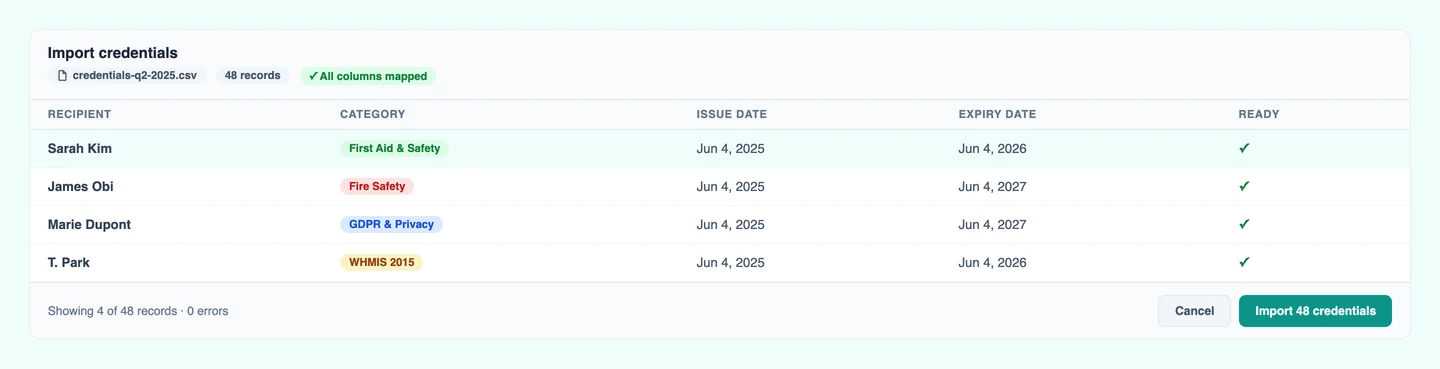
Upload a spreadsheet with hundreds or thousands of credentials. Moving from paper or old software? Migrate everything in an afternoon. Handles 1,000+ records without breaking a sweat.
- Validates dates and required fields automatically
- Detects duplicate credentials before importing
- Preview all changes before committing
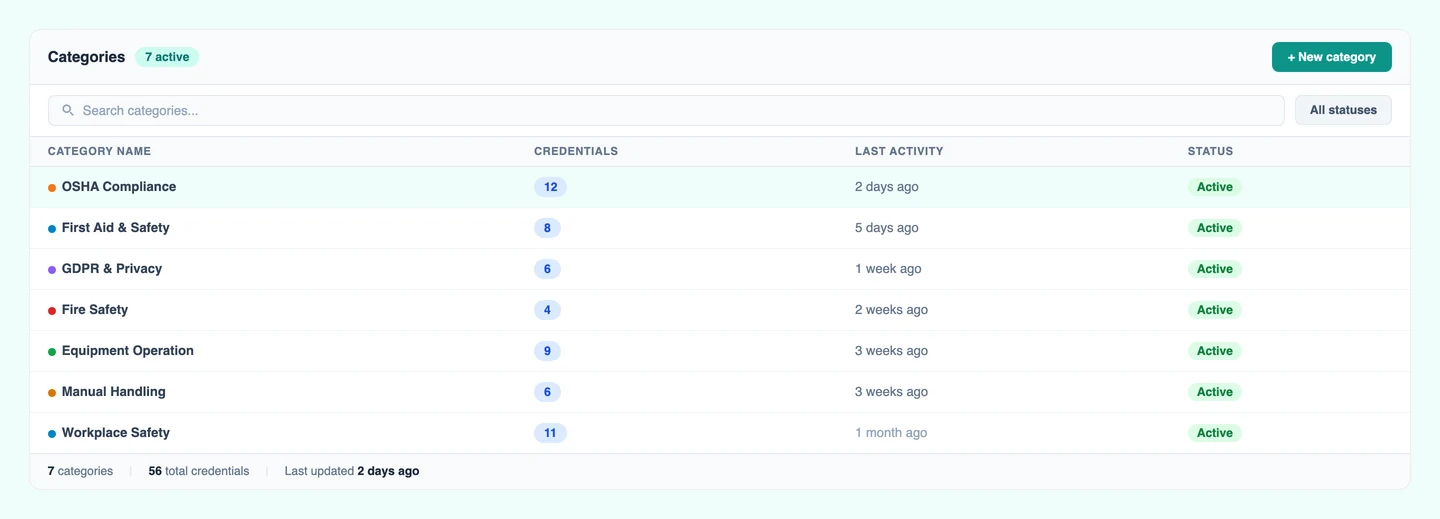
Category Organization
Sort credentials into categories like "CPR Training" or "2024 Graduates." Finding credentials shouldn't mean scrolling through everything. Categories keep things tidy and make searches instant.
- Create unlimited categories
- Bulk assign credentials to categories at once
- Merge categories if you restructure
Powerful Search & Filters
"Can you find Sarah's CPR credential from last year?" With good search, that's a 5-second task instead of a 5-minute hunt. Search by name, credential number, or course title.
- Filter by Active, Expired, or Revoked status
- Filter by category or date range
- Filter by PDF status — see only credentials missing a PDF
- Sort by date, name, or credential number
Bulk Export to CSV
Your HR department needs a list of active certifications. Your auditor wants expired credentials from last year. Export exactly what you need in one click, with no copy-pasting required.
- Export everything or just filtered results
- Opens in Excel or Google Sheets
- Perfect for reports, backups, or sharing
Credential Database
One Secure Registry for Every Credential
Every credential lives in a cloud-based registry: searchable, backed up daily, and isolated per organization. Each record gets a unique number and a permanent verification URL.
Centralized Credential Database
Cloud-based storage accessible from any device, with automatic daily backups. Organization-specific data isolation for security. Real-time sync across multiple users. No more digging through filing cabinets or spreadsheets.
Credential Registry System
Every credential gets a unique number and permanent record. Your credential registry acts as the single source of truth—anyone can verify against your official registry, building trust and preventing fraud.
Advanced Database Search
Find any record in under 2 seconds. Full-text search across all fields, filter by status or date range, and sort results by any column. Real-time results as you type.
Expiry Tracking
Expirations Caught Automatically, Not During an Audit
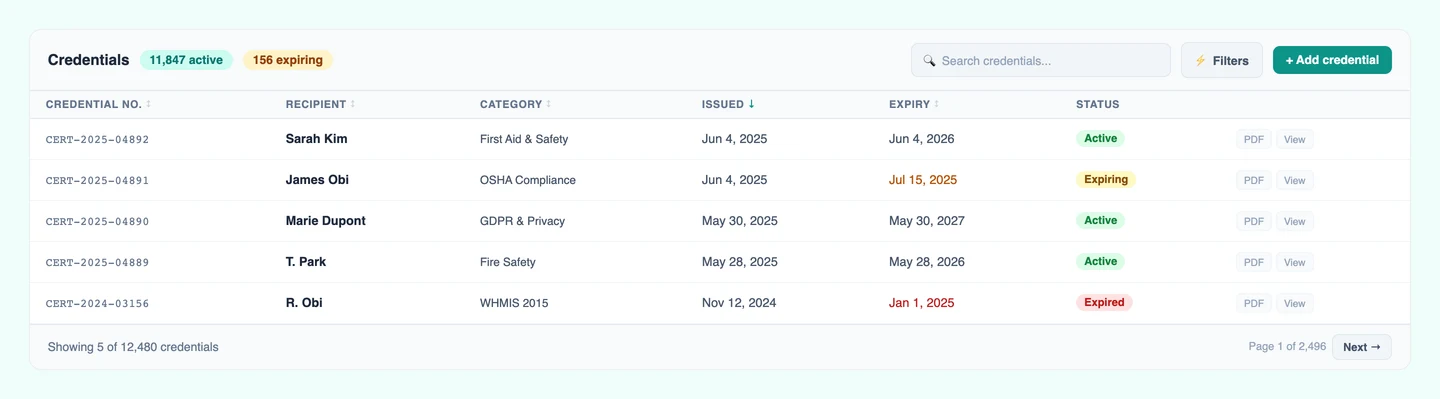
Set an expiry date and CertLister flags it when the date passes. Filter by expiring soon, update dates in bulk, and see your compliance gaps at a glance.
See full certification expiry tracking feature page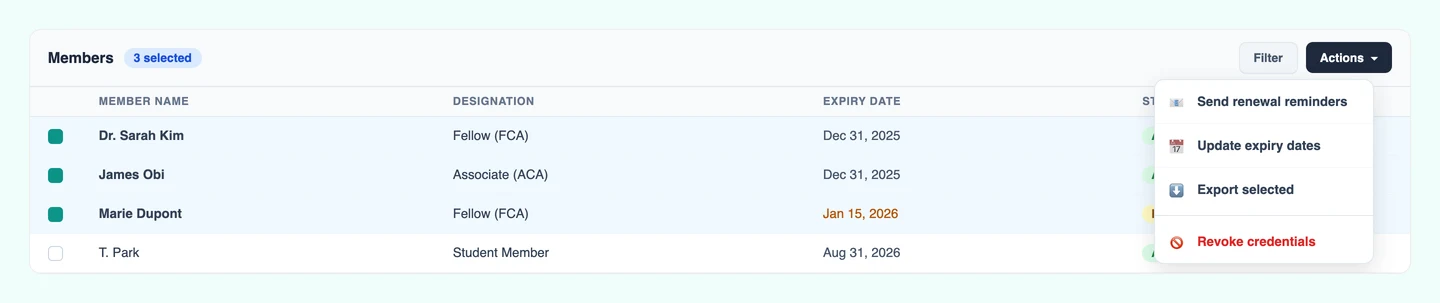
Automatic Status Updates
Credentials automatically change from "Active" to "Expired" when they pass their expiry date. No manual work required. Visual indicators show expiry status at a glance.
Bulk Expiry Updates
Your whole team just completed recertification. Select all 50 credentials and extend their expiry dates by one year, in 30 seconds instead of 30 minutes.
Dashboard Expiry Overview
Your dashboard shows how many credentials are expiring soon, this month, or have already expired. See the big picture the moment you log in. Click any number to see the actual credentials.
Expiry Date Filtering
Filter to show only credentials expiring in the next 30, 60, or 90 days. Plan renewal training sessions proactively. Sort by expiry date (soonest first) to prioritize urgent cases.
Recipient Portal
A Self-Service Home for Every Credential Holder
Give recipients a branded, always-on portal where they can view, download, and share every credential you've issued to them, without emailing your team.
See full recipient portal feature pagePasswordless Sign-In
Recipients sign in with their email address and a one-time code — no account creation, no password to forget. Sessions last 24 hours and everything is scoped to your organization.
All Credentials in One Place
Every credential you've issued to a recipient is listed in their portal, with status, issue date, expiry, and one-click access to download the PDF, view the verification page, or add it to LinkedIn.
Recipient Request Inbox Pro
Recipients can submit structured requests (name corrections, reissues, renewals, disputes) directly through the portal, linked to the specific credential. Your team reviews and responds from a unified inbox. No more email threads.
PDF Submission Review Pro
Recipients can upload a PDF linked to one of their credential records for your review. Approve it and the PDF is immediately attached to their credential and available for download from the portal.
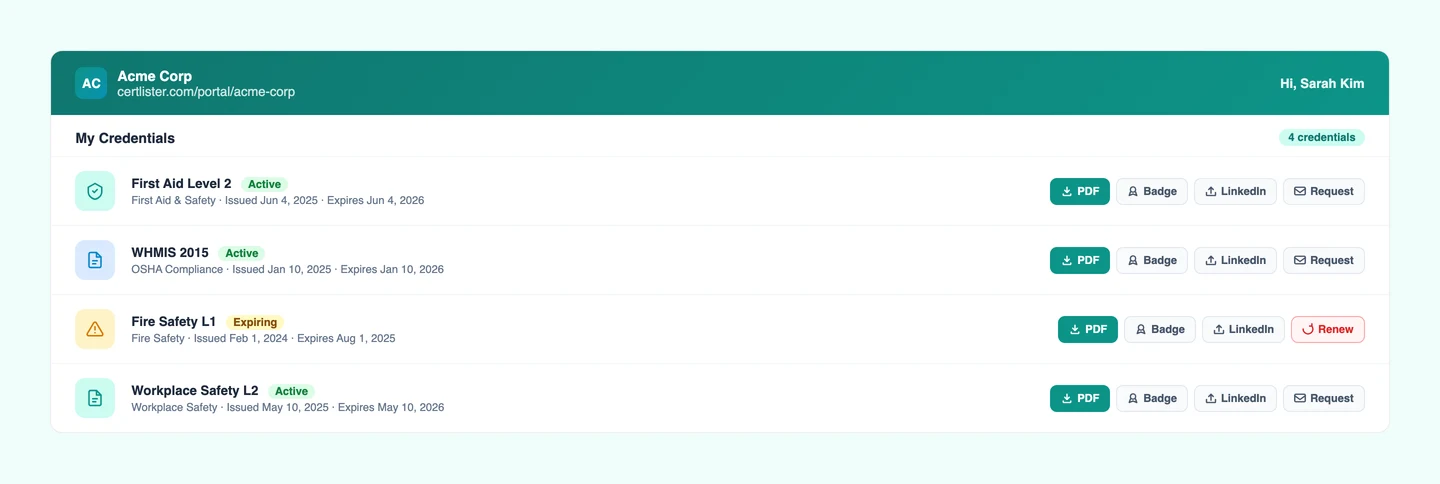
- Branded with your logo and accent color
- Scoped to your organization: recipients only see credentials you issued
- Toggle features on or off (PDF download, LinkedIn share, wallet card)
- Hide specific categories from the portal
- Available on Basic and Pro plans
Digital Badges
Credentials Recipients Can Actually Show Off
Turn every credential into a branded digital badge: a square PNG image recipients can add to LinkedIn, email signatures, and anywhere they want to showcase their achievement.
See full digital badges feature page9 Badge Shapes, 8 One-Click Palettes
Choose from 9 badge shapes — hexagon, circle, shield, ribbon, and more — then apply one of 8 one-click color palettes: Classic Pro, Technology, Healthcare, Finance, Creative, Sustainability, Modern Platform, and Accessible. Or set your own colors with the swatches so your badge matches your brand exactly. Switching shapes keeps the colors you picked.
Auto-Generate on Issue
Enable auto-generation on any credential category and badges are created automatically the moment a credential is issued, before the email is sent, so recipients receive their badge immediately in their inbox.
Built for Sharing
Recipients receive their badge as an inline image in their issue email with a one-click download. On the public verify page, the badge replaces the status seal, giving every credential a visual identity that's easy to screenshot and share.
LinkedIn Ready
Every badge verify page includes a one-click "Add to LinkedIn Profile" button, pre-filled with the credential title, issuing organization, and dates. Recipients can add the credential to their LinkedIn profile in seconds.
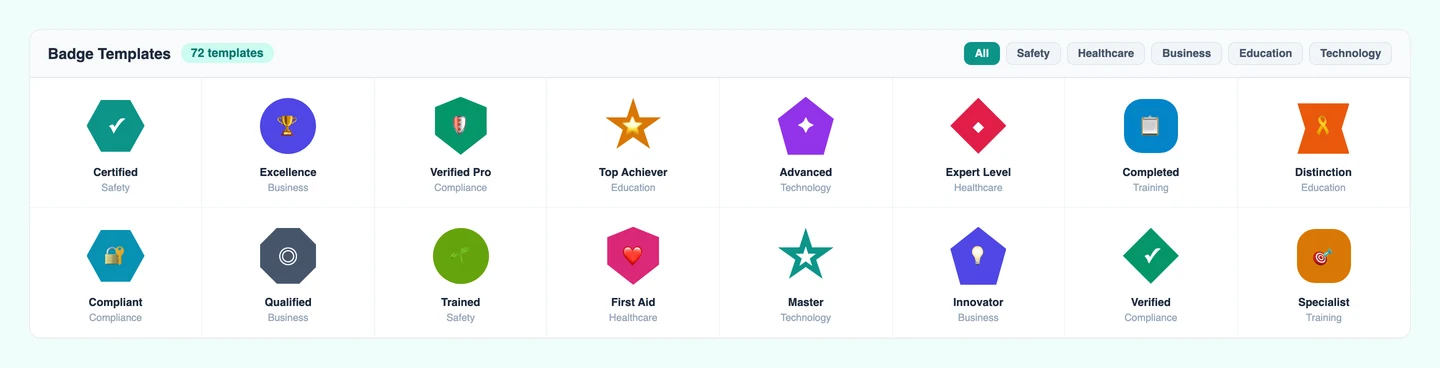
- 900 × 900 px PNG, compatible with LinkedIn, email signatures, and any platform
- Generate badges one at a time, in bulk, or batch-generate for an entire category
- Badge shown on the public verify page in place of the status seal
- Badge included inline in the recipient issue email automatically
- Backfill badges for existing credentials with one click per category
- Pro plan feature
Email Automation
Credentials Delivered, Renewals Chased, Automatically
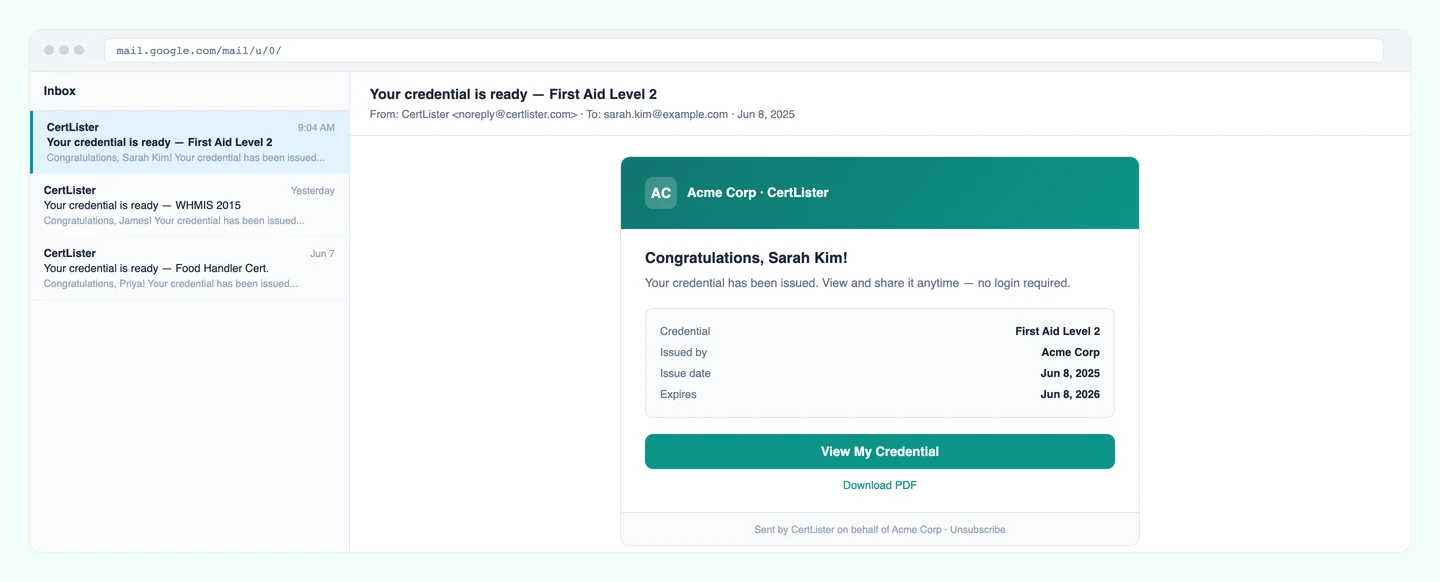
Issue a credential and the recipient gets an email with their verification link. Set an expiry reminder and they're notified before anything lapses. You do nothing.
Auto-Send Credentials to Recipients
When you create a credential, CertLister can automatically email it to the recipient. They get a personal verification link where they can view and download their credential — without you lifting a finger.
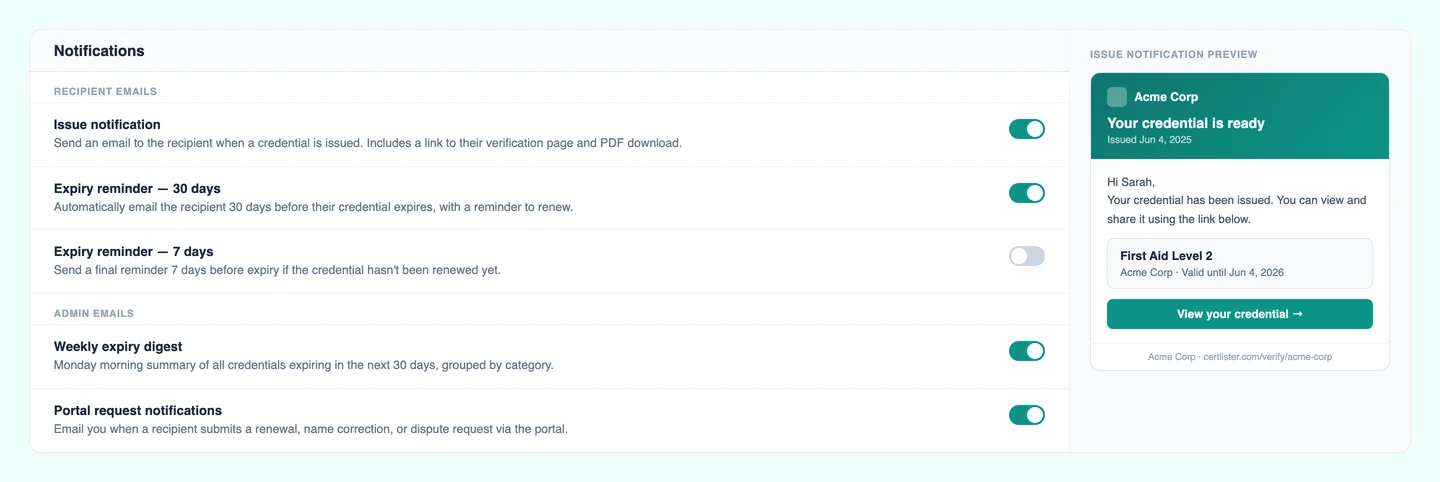
Configurable Expiry Reminder Emails
Set how many days before expiry recipients should be reminded: 30, 60, 90 days, whatever fits your workflow. Reminders go out automatically. Recipients know when to renew before anything lapses.
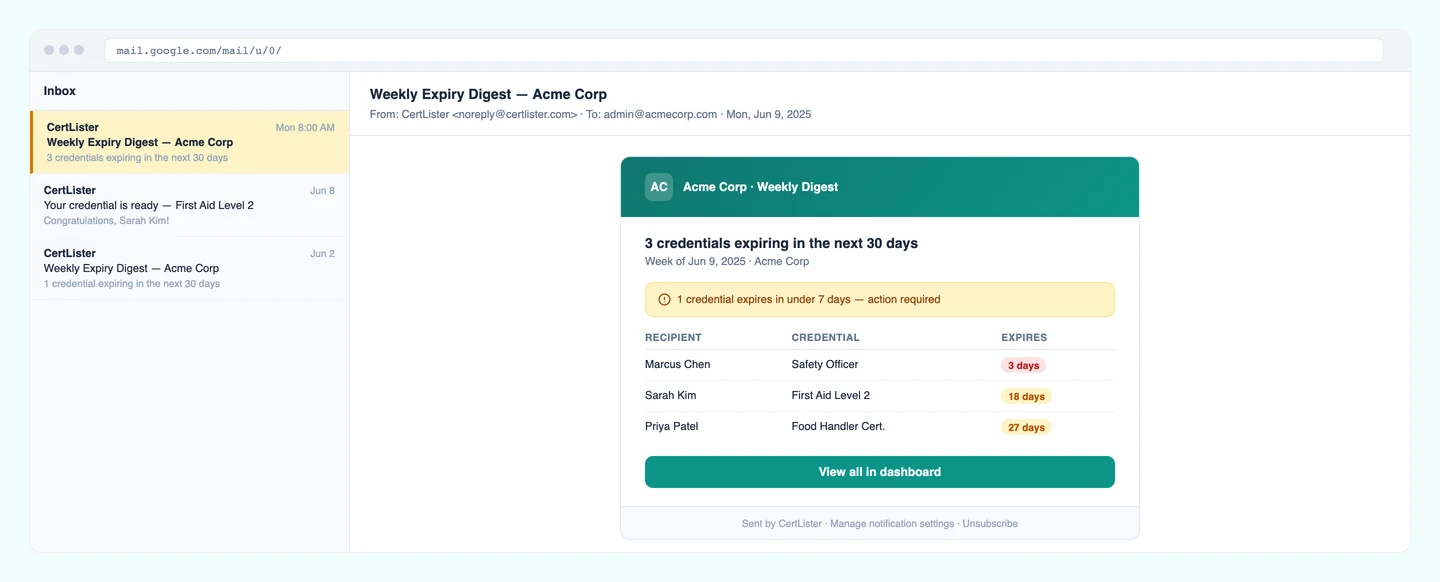
Weekly Expiry Digest for Admins
Every week, admins receive a summary of credentials expiring in the next 30 days. Stay on top of renewals across your entire organization without manually checking the dashboard.
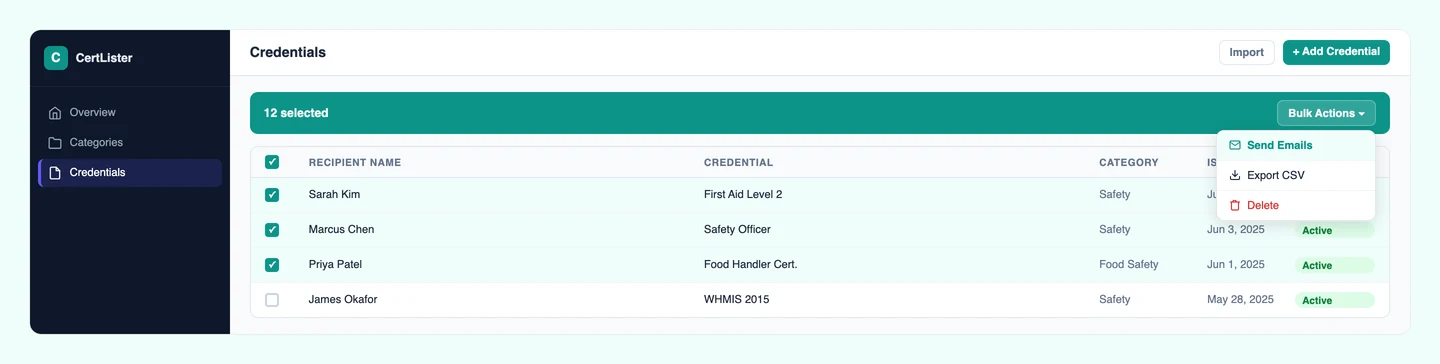
Resend & Bulk Email
Need to resend a credential to one recipient? Click the envelope icon on any row. Need to send to an entire cohort? Select them all and use Bulk Send Emails. Optionally attach the PDF directly to the email so recipients have it right in their inbox, with no link to click.
Workflow Automations
Build Custom Rules. Run Them Automatically.
Go beyond simple toggles. Create multi-step automations that trigger on any credential event (issue, expiry, revocation, or portal activity) and run exactly the actions you need, in order.
See full workflow automations feature page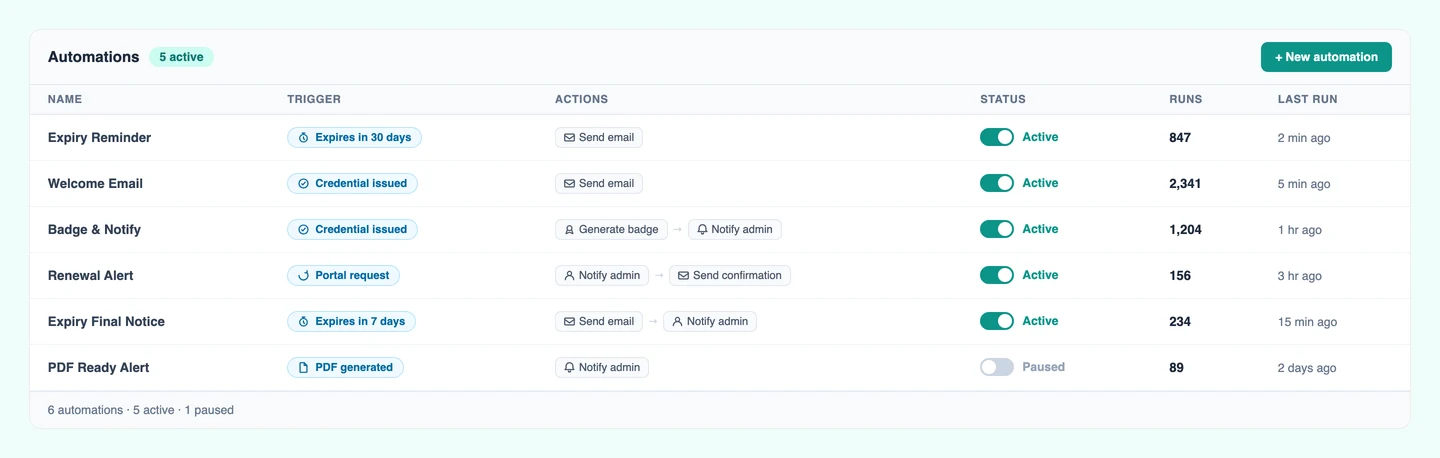
Visual Rule Builder
Define each automation with a trigger (what happened), optional conditions (which credentials qualify), and an ordered list of actions. Start from a pre-built template or build from scratch in minutes.
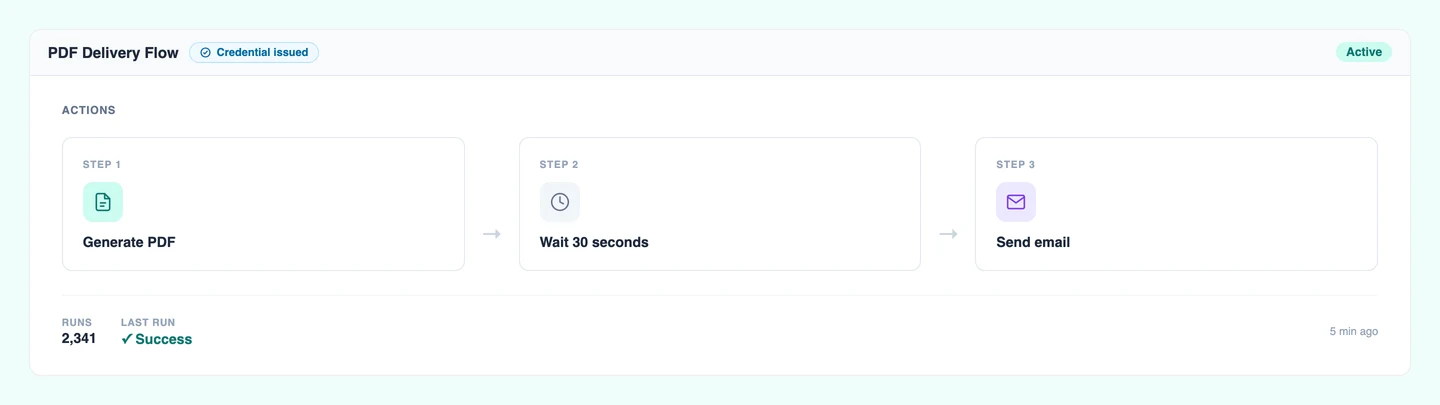
Multi-Step Action Sequences
Chain up to 10 actions per automation: generate a PDF, wait a moment, then send the email with the PDF attached. Each step runs in order, and results are logged individually so you can see exactly what happened.
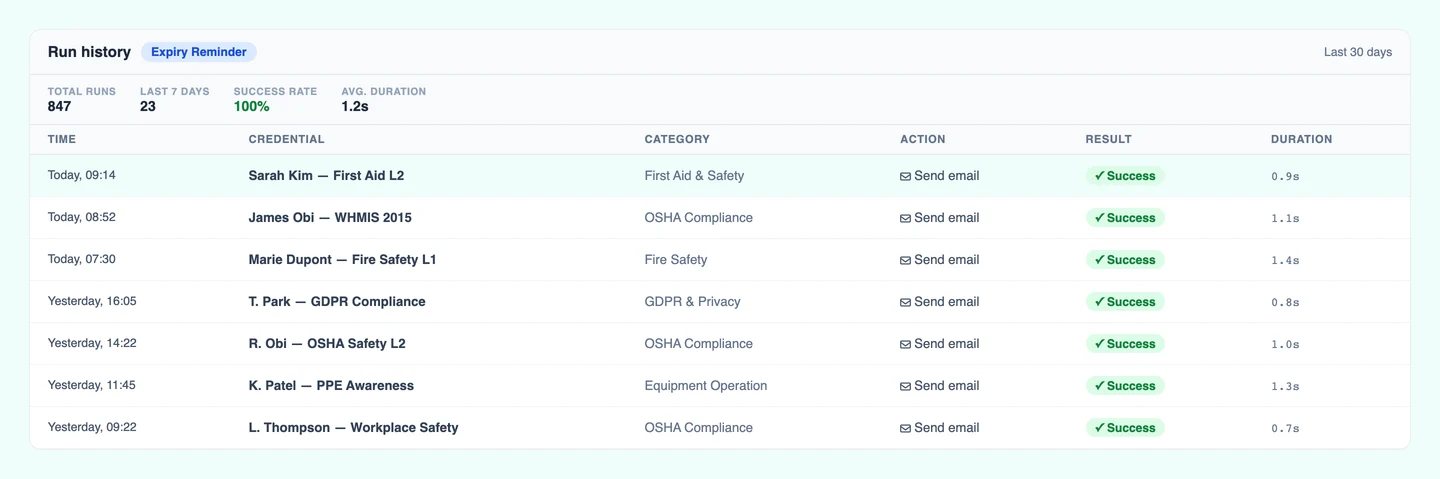
Any Trigger, Any Category
Trigger automations when a credential is issued, expiring, expired, or revoked, or when a recipient submits a portal request. Scope each automation to a specific category or let it run org-wide.
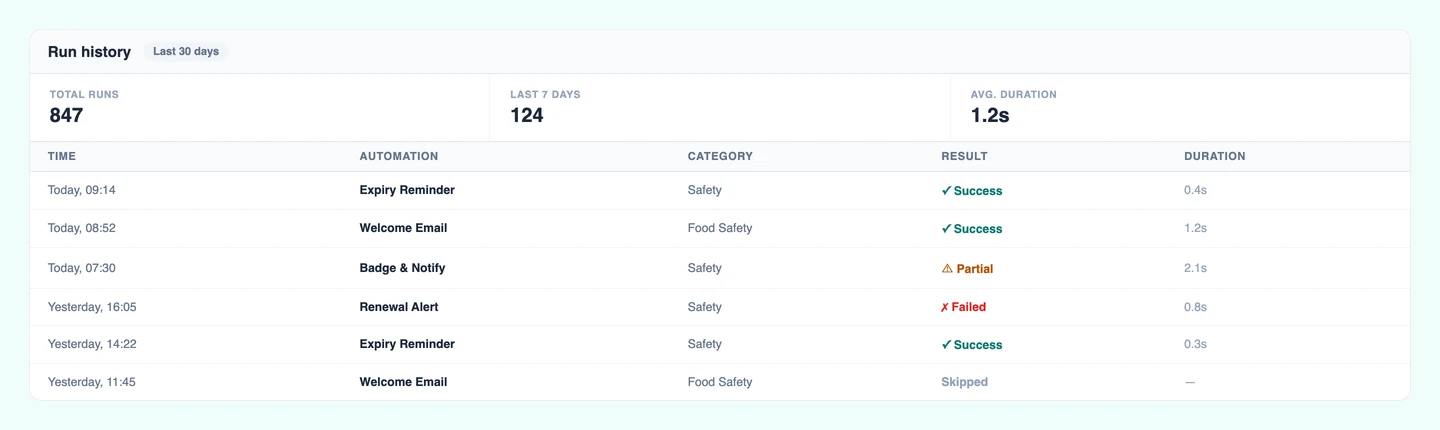
Full Run History
Every automation run is logged with a status (success, partial, failed, or skipped), timestamp, duration, and per-action detail. Know at a glance whether your automations are working, and exactly what went wrong if they're not.
Professional Certifications
Employee Certifications That Never Slip Through the Cracks
Track employee certifications, professional licenses, and mandatory training, whether you manage 20 records or 20,000.
Employee Certification Management
Track who has which certifications, when they expire, and who needs renewal. CPR, OSHA, safety training, professional licenses—all in one place.
Multi-Industry Support
Healthcare (CPR, BLS, ACLS), construction (OSHA), manufacturing, corporate training—our system adapts to any industry's specific certification requirements.
Compliance Reporting
Generate audit-ready reports showing who's certified, who's expired, and who needs renewal. Export to CSV or PDF for auditors in seconds.
Multi-Location Tracking
Organize certifications by location, department, or team. Filter by site to see compliance for each location independently—critical for multi-site organizations.
Compliance & Analytics
Compliance Records That Hold Up Under Audit
Visual dashboards, trend reports, and a logged verification trail — the data auditors ask for, ready before they ask.
Total credentials, active vs expired counts, monthly trend charts, all on one screen the moment you log in. Your director asks about last quarter? You have the answer instantly.
Mark credentials as Active, Expired, or Revoked. Revoked credentials show that status during verification, protecting your reputation and preventing fraud.
Every verification automatically logged with timestamp and IP. Export as CSV for auditors. "Prove employers verify your credentials." Done. Here's the full report.
Visual line chart showing how many credentials were issued each month. Spot trends, plan capacity, and show growth to stakeholders.
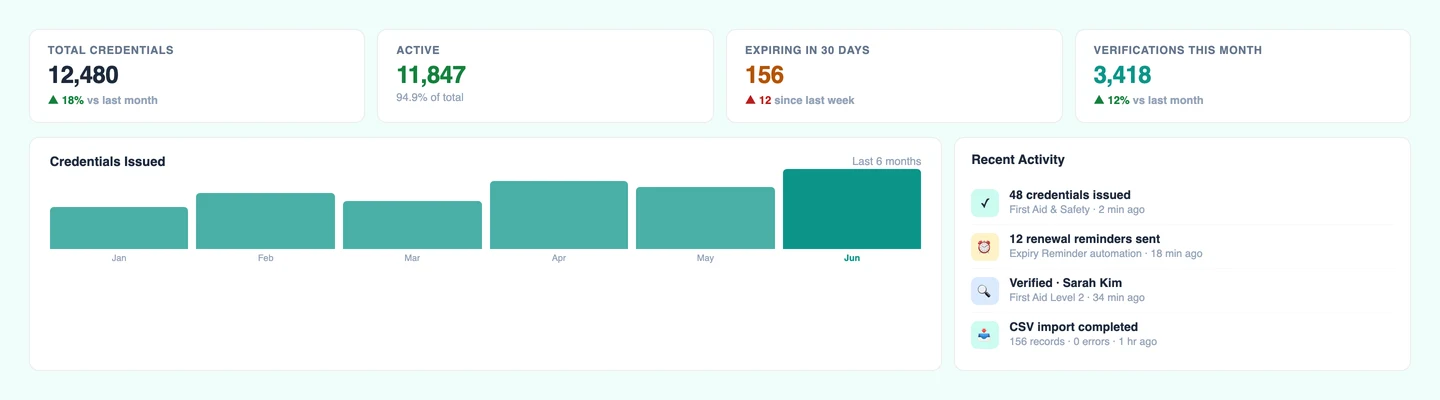
Lifecycle Management
Every Stage of the Credential Journey, Tracked Automatically
Manage credentials from creation to expiration and beyond. Every stage of the credentialing process, tracked automatically, so nothing falls through the cracks.
Issuance
Generate & distribute
Active
Verify & manage
Expiring Soon
30-day alerts
Expired
Auto-flagged
Renewal
Re-issue seamlessly
Archive
Permanent records
Healthcare
CPR certifications expire every 2 years. Track the full lifecycle to ensure medical staff maintain current certifications without gaps in compliance.
Construction
OSHA safety certifications require annual renewal. Automated expiry tracking ensures every worker has current safety training before stepping on-site.
Education
Manage hundreds of credentials at different lifecycle stages. No more tracking spreadsheets. The system handles everything automatically.
Design Studio
Design Branded Credentials, No Designer Required
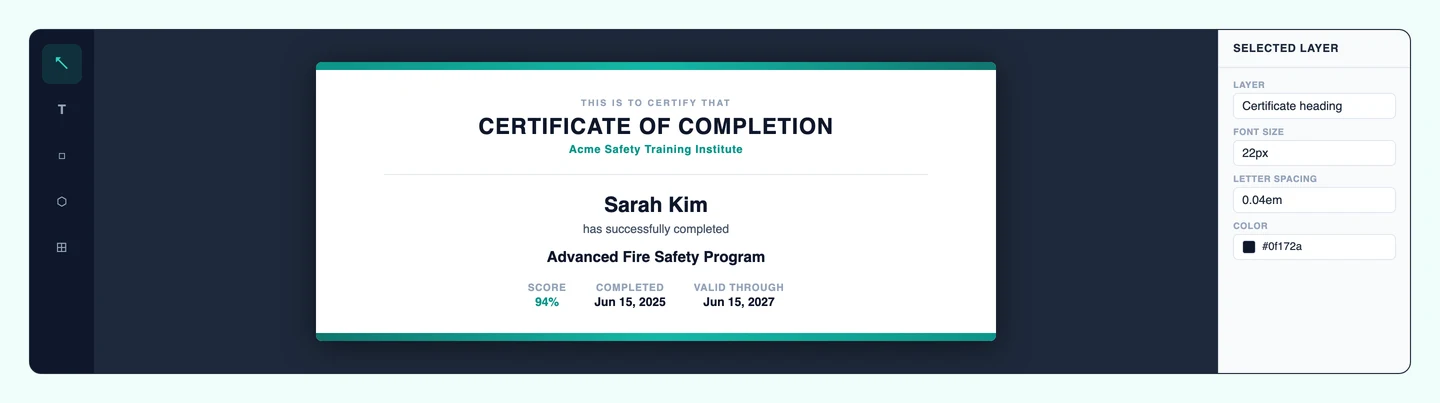
Pick a template, drag in your logo, adjust fonts and colors, and generate PDFs in bulk. The Design Studio handles the layout so you don't have to.
10 gorgeous credential designs across Classic, Modern, Elegant, and Clean styles. Pick one and you're ready to go.
Select a template, add recipient details, click generate. Your professional PDF is ready to download in seconds.
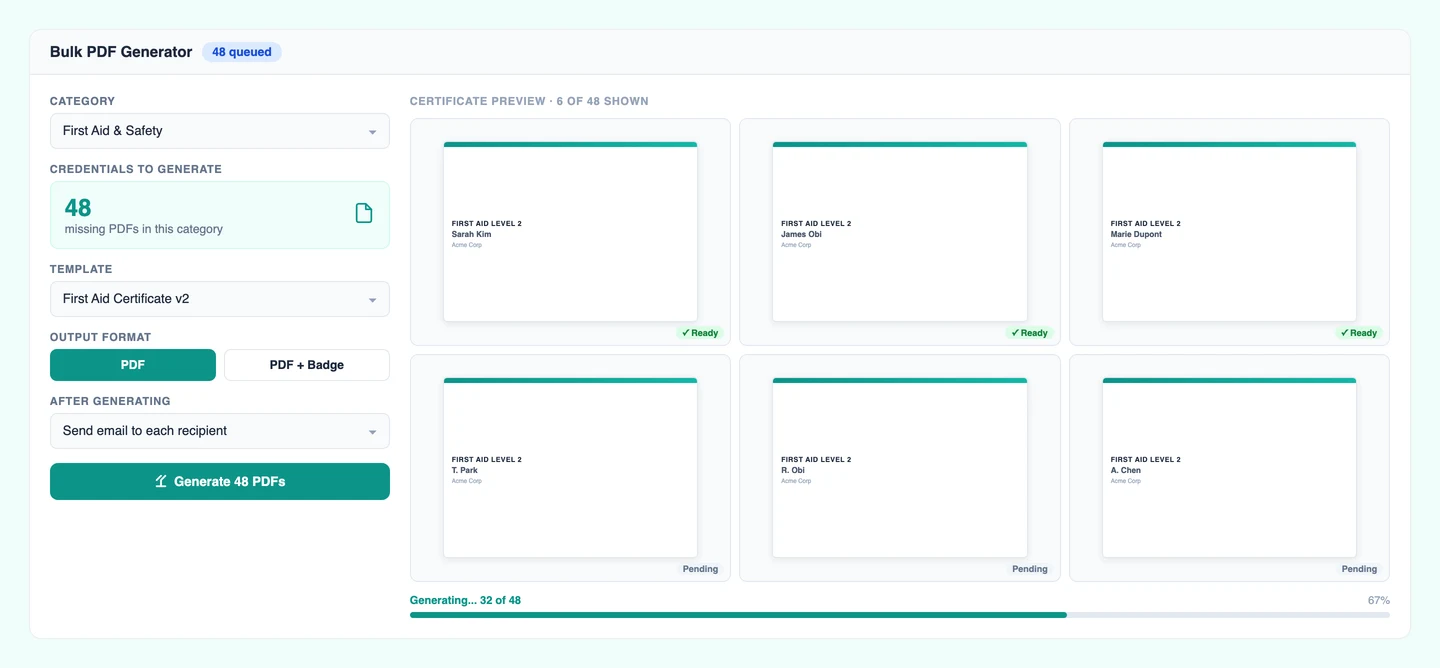
Select any credentials missing a PDF, pick a design, and generate them all in one go. A dedicated step-by-step flow walks you through selection, design choice, and progress tracking.
Every PDF stored securely in the cloud. Download anytime, from anywhere. Never lose a credential again.
Customize layouts, fonts, colors, and add your logo with our visual design editor. Make it uniquely yours.
Upload your own JPG or PNG as a credential canvas background. Use your branded stationery, official letterhead, or any custom design, with no restrictions on style.
Security & Reliability
Encrypted, Isolated, Backed Up Daily
Hosted on Google Cloud with per-organization data isolation, encryption in transit and at rest, and MFA on every plan.
Bank-Level Security
Your data is encrypted at rest and in transit using the same security standards as banks and financial institutions.
Complete Data Isolation
Your organization's data is completely separate from everyone else's. Database-level isolation for maximum security.
Google Cloud Infrastructure
Hosted on Google Cloud Platform with 99.9% uptime. Your credentials are available whenever you need them.
Automatic Backups
Daily backups mean your data is always safe. Even if something goes wrong, everything can be fully restored.
Role-Based Access Control
Multiple users with different permission levels. Admins get full access, staff get limited access. You control who sees what.
Your Data, Always
Export your complete dataset anytime in CSV or PDF format. You're never locked in. It's your data to take wherever you want.
On Every Plan
Custom Credential Attributes
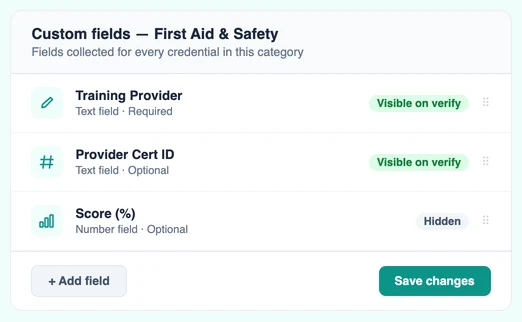
Every organization tracks different information. Custom attributes let you add domain-specific data fields to any credential category, and they show up everywhere: in your credential table, on generated PDFs, and on the public verify page.
Define fields per category
Add fields like Score, Trainer Name, Training Hours, Pass/Fail, or Notes to any credential category. Each category can have its own set of attributes.
Printed on generated PDFs
Attribute values are automatically included in credential PDFs when you generate them, with no manual editing required.
Visible on the public verify page
Employers and licensing boards see custom attribute values when they verify a credential, giving them the context they need to confirm compliance.
Example use cases
Plus Everything Else You'd Expect
The details that make daily use smooth.
Multi-User Support
Add team members with different roles. Admins can do everything, managers can create, users can view only.
Mobile Friendly
Manage credentials from your phone or tablet. The entire system works beautifully on any device.
Import from Anywhere
Moving from paper, Excel, or old software? Our CSV import makes migration painless.
Export Everything
Export your data anytime as CSV or bulk-download generated PDFs as a ZIP archive. You're never locked in.
Fast Search
Find any credential in under 2 seconds, even with thousands of records in the system.
Dark Mode
Prefer dark backgrounds? We've got you covered with automatic light/dark theme switching.
Google Sign-In
Sign in with your Google account, so there's no separate password to remember.
Related Articles
Best Credly & Accredible Alternatives in 2026 (5 Compared)
An honest comparison of Credly, Accredible, Certifier, Badgr, and CertLister across pricing, features, and best-fit use cases — so you can pick the right platform.
Read moreCertLister vs Credly: Which Digital Credential Platform Is Right for You?
An honest comparison of CertLister and Credly — pricing, features, and who each platform is actually built for. No sales spin.
Read moreHow to Create a Custom Credential Design (Without a Designer)
A practical walkthrough of CertLister's Design Studio — how to build a fully branded credential template from scratch using the drag-and-drop canvas.
Read moreSee It All in 5 Minutes
Create a free account, issue a credential, and try every feature on this page. No credit card, no sales call.
Free plan includes 10 credentials a month. Upgrade anytime.