
Plans & Billing
Time to read: 6 minutes
Overview
CertLister uses a credit-based pricing model. Every credential costs 1 credit. All accounts receive 10 free credits each month. Need more? Buy credit packs or subscribe to Basic/Pro for monthly credit allotments and additional features. Current plan prices are on the pricing page.
Billing page: https://app.certlister.com/billing
Plan Comparison
Limits
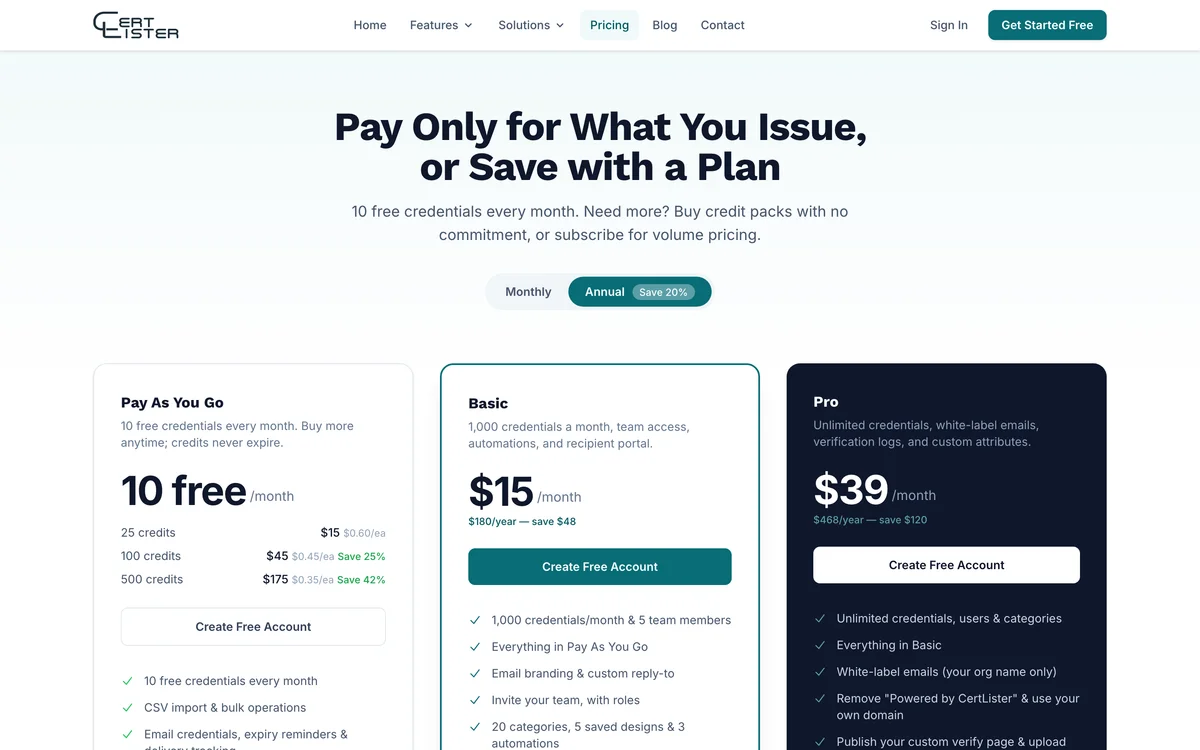
| Pay As You Go | Basic | Pro | |
|---|---|---|---|
| Credentials | 10 free/mo + packs | 1,000/mo | Unlimited |
| Team members | 1 | 5 | Unlimited |
| Saved designs | 3 | 5 | Unlimited |
| Categories | 3 | 20 | Unlimited |
Credit Packs (Pay As You Go)
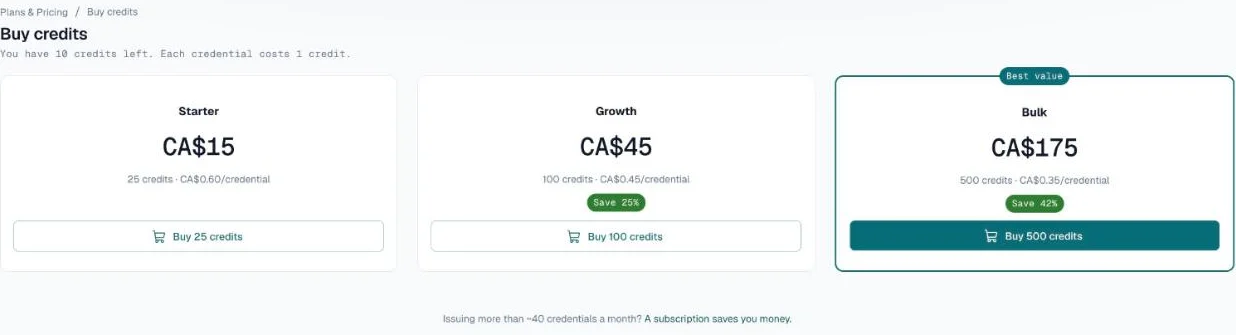
Buy credits anytime — no subscription required. Credits never expire.
| Pack | Credits | Price | Per credential |
|---|---|---|---|
| Starter | 25 | CA$15 | CA$0.60 |
| Growth | 100 | CA$45 | CA$0.45 |
| Bulk | 500 | CA$175 | CA$0.35 |
Subscription Pricing
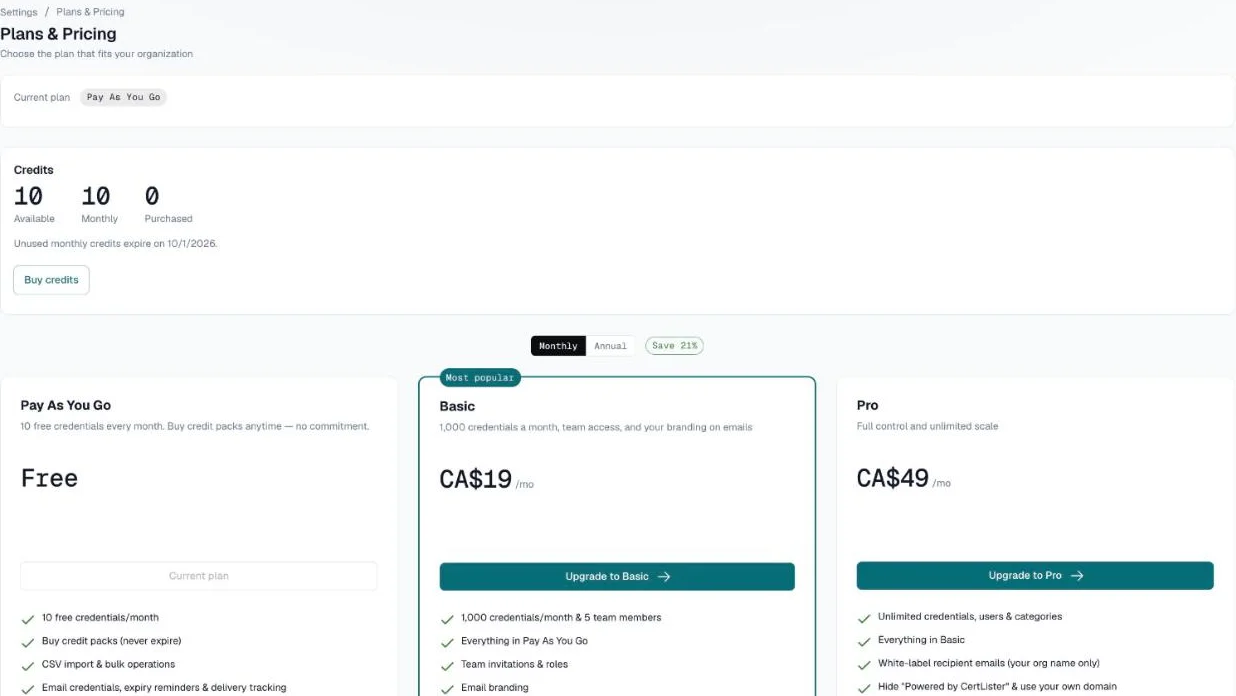
| Monthly | Annual (per month) | Annual total | |
|---|---|---|---|
| Pay As You Go | CA$0 | CA$0 | CA$0 |
| Basic | CA$19 | CA$15 | CA$180 |
| Pro | CA$49 | CA$39 | CA$468 |
Annual billing saves approximately 21% on Basic and 20% on Pro.
What's Included in Each Plan
Pay As You Go (Free tier)
Every account starts here. 10 free credentials every month, buy credit packs anytime.
- 10 free credits/month, 1 team member, 3 saved designs, 3 categories
- 3 legacy SVG credential templates (Classic, Modern, Elegant)
- Design Studio with all 10 background templates
- CSV import and CSV export
- Bulk operations (bulk delete, bulk status/category/expiry update)
- Bulk PDF generation, and bulk download of generated PDFs as a ZIP archive
- Email credentials to recipients, with the PDF attached
- Expiry reminders, and a weekly expiry digest for admins and managers
- Dashboard analytics and charts
- Organization logo and brand color on your verification page
- Google OAuth sign-in
- Custom verification URL (e.g.,
https://certlister.com/verify/acme-corp/) - Email notifications
- Public verification page
- Embeddable verification widget (on your website)
- Wallet card credentials — generate credit card-sized two-sided PDFs for physical carry (ISO 7810 ID-1 format)
- Custom credential attributes — define domain-specific data fields per category (e.g., Score, Instructor) that appear in PDFs and on the verify page
- Custom field label names — rename any standard field (e.g., rename "Recipient Name" to "Student Name") on the verification page and in the credentials table and form
- Customize verify page display per category — choose which fields appear on the public verification card, and in what order
- Custom credential number prefix, sequential numbering, and per-category prefixes
- Open Badge 3.0 (OB3) badges
- Recipient portal
- 1 workflow automation
- Verification report and verification logs (see who verified which credentials)
- Email delivery tracking (delivered, bounced, failed)
Basic — CA$19/month
Best for small organizations issuing credentials regularly.
Everything in Pay As You Go, plus:
- 1,000 credits/month, 5 team members, 5 saved designs, 20 categories
- Team management and invitations
- Credential Activity and Team Activity reports
- Email branding (custom reply-to, subject and intro)
- 3 workflow automations
Pro — CA$49/month
Best for organizations that need the complete platform.
Everything in Basic, plus:
- Unlimited credentials, team members, designs, and categories
- Design asset uploads (upload logos, signatures, and images in the Design Studio)
- Remove "Powered by CertLister" branding from the verification widget and page
- White-label recipient emails — emails are sent in your organization's name with no CertLister mention
- Custom email footer text — add your own text to every outgoing credential email
- Priority email support
Note: Auto-expiry (automatically flipping credentials to Expired when their date passes) and attaching the credential PDF to recipient emails are both available on all plans — including Pay As You Go.
Recent Plan Updates
Embeddable verification widget — available on all plans All plans can embed the <certlister-verify> component on their website using the web component or iFrame embed.
Auto-expiry — available on all plans The status auto-flip (Active → Expired) when an expiry date passes is available on every plan, including Pay As You Go.
Credits — How They Work
Every credential you create costs 1 credit. All accounts receive 10 free credits at the start of each month (use-it-or-lose-it — they don't roll over). Basic subscribers receive 1,000 credits/month. Pro has unlimited credentials.
Purchased credit packs never expire. Buy them on the Buy credits page: go to Settings → Plan & Billing, click See plans, then Buy credits. There are three packs — 25, 100 or 500 credits.
What uses a credit: Creating a new credential (manual, CSV import, or API). What's free: Editing credentials, regenerating PDFs, sending/resending emails, verifying credentials, downloading existing PDFs.
Deleting a credential (or returning it to draft) gives its credit back if the credit came from this month's allowance or a purchased pack. A credit from an earlier month's allowance has already expired, so it does not come back.
Upgrading Your Plan
Admins only.
- Go to Settings → Plan & Billing and click See plans, or visit https://app.certlister.com/billing
- Choose Monthly or Annual billing
- Click Upgrade to Basic or Upgrade to Pro
- You are redirected to Stripe Checkout to enter payment details
- After payment, the new plan is active immediately
Upgrading mid-cycle: When upgrading from Basic to Pro, the difference is prorated — you pay only for the remaining days in your billing period.
Downgrading Your Plan
Admins only.
- Go to Settings → Plan & Billing or visit https://app.certlister.com/billing
- Click Change Plan and select a lower plan (or Pay As You Go)
- Your current plan remains active until the end of the billing period
- A banner appears in your account showing the scheduled downgrade date with an Undo button
- On the downgrade date, your account moves to the new plan automatically
Note: Downgrading does not delete any data. If you exceed the new plan's limits (e.g., more than 1,000 credentials on Basic), existing credentials are retained — you will receive 10 free credits a month and can buy packs anytime.
Cancelling Your Subscription
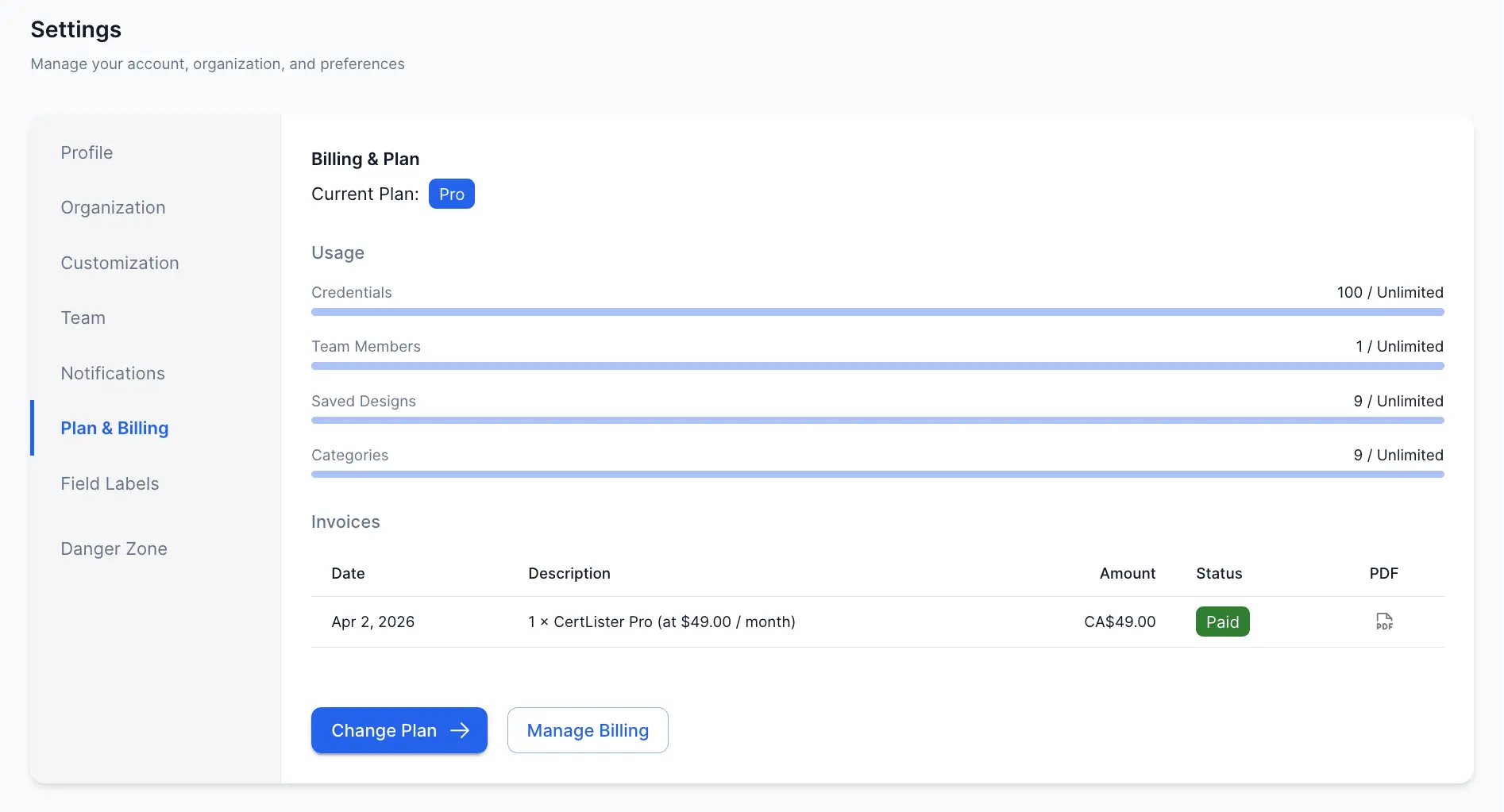
- Go to Settings → Plan & Billing → click Manage Billing to open the Stripe Customer Portal
- In the portal, cancel your subscription
- Your plan remains active until the end of the paid period, then moves to Pay As You Go
You'll continue receiving 10 free credits a month.
Alternatively, select Pay As You Go on the billing page and confirm the cancellation.
Undoing a Pending Change
If you have a scheduled downgrade or cancellation and change your mind:
- Go to Settings → Plan & Billing
- The pending change banner shows the scheduled change and date
- Click Undo to revert the change and keep your current plan
Billing Management via Stripe Portal
For payment method updates, invoice downloads, and billing history:
- Go to Settings → Plan & Billing
- Click Manage Billing (Admin only)
- You are redirected to the Stripe Customer Portal
- After making changes, click Return to CertLister
CertLister automatically syncs your billing state when you return from the portal.
Usage Tracking
Your credit balance is shown in the sidebar, under your organization name.
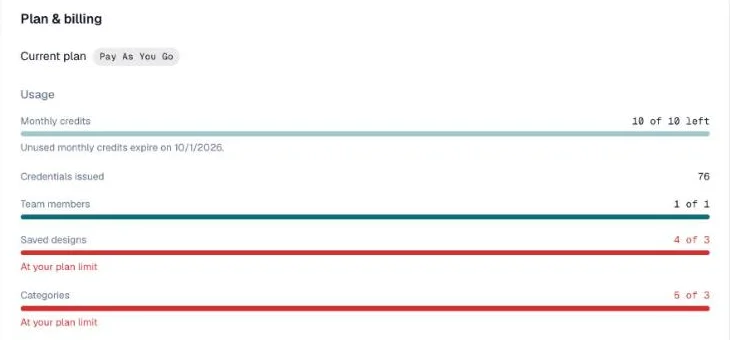
For the full picture, go to Settings → Plan & Billing. It shows:
- Your current plan
- Monthly credits left, and the date unused ones expire
- Credentials issued so far
- Team members, Saved designs and Categories, each against your plan's limit. A bar turns red with "At your plan limit" when you reach it — for example after a downgrade, when you keep more than the new plan allows
- Credit history — every credit added or used, with its date
"Powered by CertLister" Branding
The embeddable widget and public verify page include a small "Powered by CertLister" footer on Pay As You Go and Basic plans. This is removed automatically on Pro.
| Plan | "Powered by CertLister" footer |
|---|---|
| Pay As You Go | Always shown |
| Basic | Always shown |
| Pro | Hidden automatically |
There is no manual toggle — it is a plan-level rule.
Frequently Asked Questions
Q: Can I switch between monthly and annual billing?
A: You can switch billing cycles from Settings → Plan & Billing — click "Change Plan" to see billing cycle options. Annual billing saves approximately 20% compared to monthly.
Q: Is there a refund policy?
A: Contact support@certlister.com for billing questions. Refund requests are handled on a case-by-case basis.
Q: What payment methods are accepted?
A: Major credit and debit cards (Visa, Mastercard, American Express) via Stripe. Additional payment methods depend on your region.
Q: What happens to my data if I cancel?
A: Your data is retained. You can still access your credentials on the Pay As You Go plan — you'll receive 10 free credits a month and can buy packs anytime. Data is only deleted if you explicitly delete your account.
Q: Can I have multiple organizations under one account?
A: Not currently. Each CertLister account is tied to one organization.
Q: Do purchased credits expire?
A: No. Purchased credit packs never expire. Your 10 monthly free credits reset at the start of each month.
Q: What counts as using a credit?
A: Creating a new credential uses 1 credit. Editing, emailing, verifying, and downloading existing credentials is always free.
Q: Do custom attributes remain accessible after a downgrade?
A: Yes. Custom attributes are on every plan, so your fields and their values stay exactly as they are.