
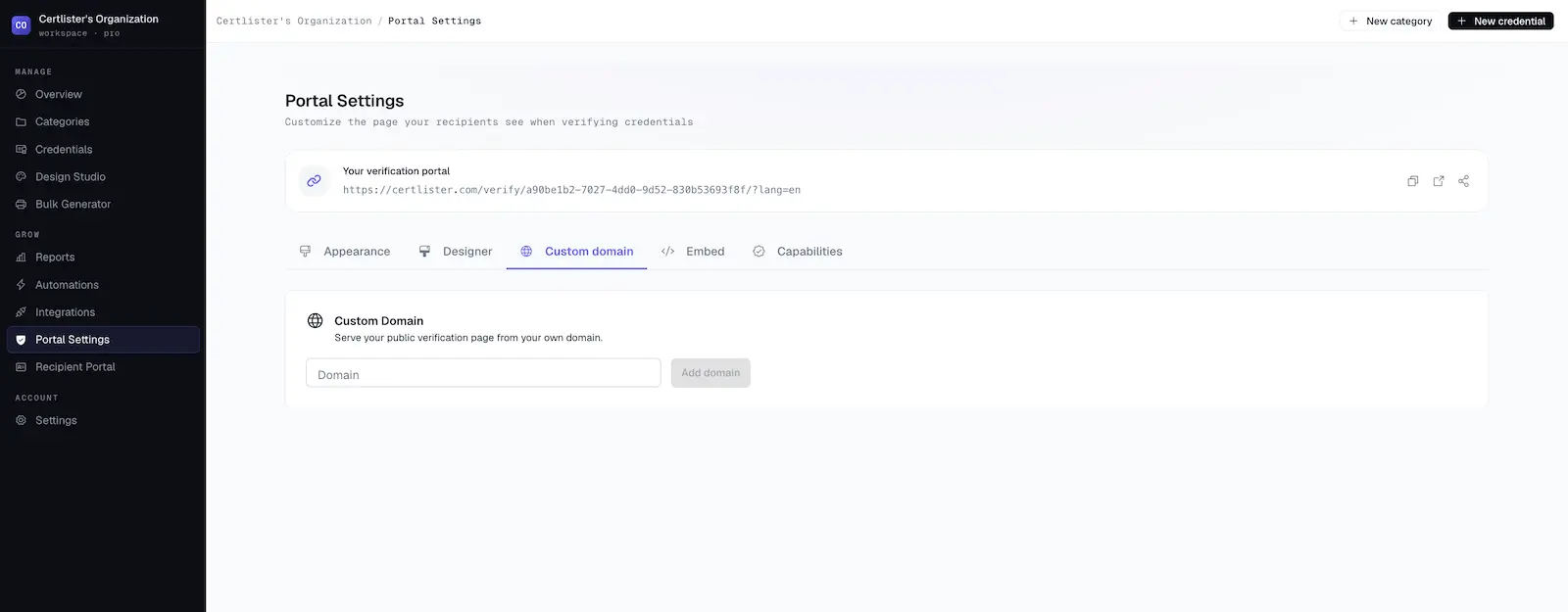
Custom Domain: Your Verify Page on Your Own Domain
Time to read: 6 minutes
Overview
On the Pro plan, you can serve your public verify page from your own domain instead of certlister.com. The certificate verification system page explains how the public verify page works.
Before:
https://certlister.com/verify/acme-corp
After:
https://verify.acme.com/verify/acme-corp
Visitors who open an existing certlister.com verification link are forwarded to your domain automatically, and the page itself is identical — your branding, your credentials, the same real-time verification.
| Plan | Pro only |
| Domains per organization | One |
| SSL certificate | Automatic and free |
| Setup time | ~10 minutes, plus DNS propagation |
Before You Start
You'll need:
- A Pro plan — custom domains are a Pro feature. See Plans & Billing.
- Access to your domain's DNS settings — you'll create one DNS record at your provider (GoDaddy, Namecheap, Cloudflare, etc.).
- A subdomain — for example
verify.yourcompany.comorcredentials.yourcompany.com. Root domains likeyourcompany.comcan't normally be used: the setup requires a CNAME record, and most DNS providers don't allow a CNAME on the root domain. A subdomain also keeps your main website untouched.
Setup
Step 1: Add Your Domain
- Log in to CertLister
- Go to Verification Page in the left navigation
- Open the Custom Domain tab
- Enter your subdomain (e.g.,
verify.yourcompany.com) and click Add domain
CertLister registers the domain and shows the DNS record to create.
Step 2: Create the CNAME Record
The Custom Domain tab now shows a single DNS record:
| Type | Name | Value |
|---|---|---|
| CNAME | verify.yourcompany.com | cname.certlister.com |
Create this record at your DNS provider. Use the copy button next to the value to avoid typos.
Provider notes:
- Many providers want only the subdomain part in the Name/Host field — enter
verify, notverify.yourcompany.com. Check your provider's format. - Cloudflare users: set the record to DNS only (gray cloud). With the orange proxy cloud enabled, verification can't complete.
That's the only record you need. Ownership verification and the SSL certificate are handled automatically once the CNAME is in place.
Step 3: Check Status
Back in CertLister, click Check status. DNS changes usually take effect within a few minutes, though some providers take longer.
| Status | Meaning | What to do |
|---|---|---|
| Pending DNS | We can't see your CNAME record yet | Create the record, wait a few minutes, click Check status again |
| Verifying | DNS looks good — your SSL certificate is being issued | Nothing — this usually completes within a few minutes |
| Active | Your domain is live | Visit https://verify.yourcompany.com/verify/ |
| Error | Something needs attention | Read the message shown under the status — see Troubleshooting |
The registration stays available for 7 days while you set things up, and the page re-checks automatically in the background while it's open.
What Happens to Your Links
Once your domain is Active:
- certlister.com links forward automatically. Anyone opening
https://certlister.com/verify/acme-corpis redirected tohttps://verify.acme.com/verify/acme-corp. You don't need to update anything you've already shared. - Embedded widgets keep working unchanged. If you've embedded the verification widget on your website, the iframe continues to load from certlister.com — no re-embedding needed.
- QR codes and emails stay durable. QR codes on credential PDFs and links in credential emails always encode certlister.com URLs. This is deliberate: a printed credential must keep working for years, even if you change or remove your custom domain someday. Visitors scanning a QR code are simply forwarded to your domain while it's active.
Your verify page is available at both:
https://verify.yourcompany.com/verify/— your organization's pagehttps://verify.yourcompany.com/verify/your-slug/— the same page, with your URL slug spelled out
Troubleshooting
"Your CNAME points to X — it should point to cname.certlister.com"
Your CNAME record exists but has the wrong target. Edit the record at your DNS provider so its value is exactly cname.certlister.com, then click Check status again.
Status stays on "Pending DNS"
- DNS propagation can take from a few minutes up to a few hours, depending on your provider and the record's TTL.
- Double-check the Name/Host field. A common mistake is entering
verify.yourcompany.comwhere the provider expected justverify(or vice versa), which silently creates a record likeverify.yourcompany.com.yourcompany.com. - You can check what the rest of the world sees at dnschecker.org — look up your subdomain as a CNAME.
Status shows "Error" after several days
If the CNAME isn't found within the 7-day window, the registration expires. Click Remove domain, then add the domain again and complete the DNS step.
Using Cloudflare for your DNS
Set the CNAME record to DNS only (gray cloud icon). With Cloudflare's proxy enabled (orange cloud), verification and SSL issuance can't complete.
The domain is Active but the browser shows a security warning
The SSL certificate is issued right as the domain becomes active. If you see a certificate warning in the first few minutes, wait a moment and refresh. If it persists, remove and re-add the domain, or contact support.
Removing Your Domain
- Go to Verification Page → Custom Domain
- Click Remove domain and confirm
Verification links fall back to certlister.com immediately. Existing QR codes and emails keep working — they always point to certlister.com.
FAQ
Q: Can I add more than one domain?
A: No — one custom domain per organization. You can remove your domain and add a different one at any time.
Q: Does my whole account move to my domain?
A: No. Only the public verify page is served from your domain. The CertLister app and the recipient portal keep their current addresses. Visiting the root of your domain (https://verify.yourcompany.com/) takes you to your verify page, and any other path redirects to the CertLister app.
Q: Can I use my root domain (yourcompany.com)?
A: Use a subdomain instead. Root domains generally can't hold a CNAME record, and pointing your root domain at CertLister would take over your main website.
Q: How much does the SSL certificate cost?
A: Nothing. The certificate is issued automatically when your domain activates and renews automatically.
Q: Do I need to update my embedded widget?
A: No. Embeds keep loading from certlister.com by design.
Q: What domains are rejected?
A: certlister.com subdomains, bare IP addresses, and invalid hostnames.
Q: What happens to printed credentials with QR codes if I remove my domain?
A: Nothing breaks. QR codes always encode certlister.com URLs — with a custom domain active, visitors are forwarded to it; without one, they simply stay on certlister.com.